Filtering bad leads at the source: stop burning ad money
Stop wasting ad spend and sales time on leads that were never going to buy. A practical guide to filtering bad leads at the source, not after the fact.
Every business owner knows the small thrill of a full inbox. Twenty new inquiries since Monday, the form is clearly working, the ad budget is doing its job. Then you actually read them: three want a job, four have a budget a tenth of your smallest project, two are competitors poking around, and one lives in a country you do not ship to. Bad lead filtering is the quiet skill that decides whether those twenty inquiries are a win or an expensive distraction.
This article is about stopping unqualified leads before they ever reach your pipeline — at the ad, the landing page, and the form — rather than cleaning them out after they have already cost you money and an afternoon. That single distinction changes almost everything about how you spend.
Filtering at the source is not disqualifying later
Most advice about bad leads is really about what to do once they are already in your system: you score them, run them through a checklist, mark them lost. That work matters, and frameworks like BANT and MEDDIC qualification exist for exactly that reason. But by the time you disqualify a lead, you have already paid for it twice.
Source filtering asks an earlier question: how did this person get here, and could you have made it less likely? A tire-kicker who never fills out your form costs you nothing. One who does costs you a click, a notification, a reply, and a small dent in your team's faith that the leads are worth chasing.
Think of it as two jobs. Lead scoring and disqualification are the bouncer checking IDs inside the club. Source filtering is the sign on the door that tells the wrong crowd not to queue at all.
What a bad lead actually costs you
The obvious cost is ad money. If you pay per click, every unqualified visitor who clicks your ad spends your budget whether or not they were ever going to buy. Filter poorly and you hand a real slice of your monthly spend to people searching for free templates, salary figures, or a do-it-yourself tutorial.
The second cost is quieter and often larger: your team's time. A two-person sales desk can only make so many calls a day. Every hour spent qualifying and then rejecting a hopeless inquiry is an hour stolen from someone ready to buy — and slow follow-up is exactly how you lose the good ones, which is why the first-five-minutes response window matters so much.
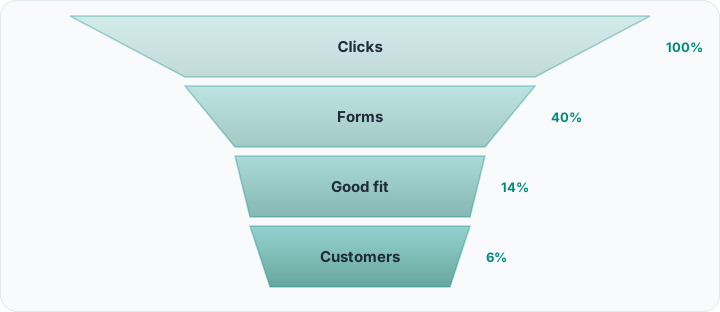
There is a third cost that rarely shows up in a spreadsheet: bad leads poison your data. When half your leads were never real, your conversion rate looks broken, your cost-per-lead lies to you, and you make budget decisions on numbers that do not mean what you think.
Start at the ad: negative keywords and honest copy
The cheapest filter you own runs before anyone clicks. On search platforms, negative keywords tell the system which searches should never trigger your ad. Words like free, cheap, jobs, salary, internship, and how-to are classic budget-drainers for most paid accounts.
Spend twenty minutes in your search-terms report and you will usually find the culprits: the actual phrases people typed before clicking. Add the irrelevant ones to your negative list and you stop paying for that traffic tomorrow, not next quarter.
The second lever is honesty in the copy itself. An ad that promises premium custom kitchens installed in six weeks quietly repels the person hunting for a flat-pack bargain. Naming who you are for, and roughly what you cost, turns your ad into a self-selection filter. You will get fewer clicks. That is the point.
The landing page and form do the heavy lifting
Once someone clicks, the landing page is your next filter. Vague pages attract vague leads. A page that clearly states who the product is for, what problem it solves, and what a typical engagement looks like will sort visitors before they ever touch the form.
The form is where most small businesses get filtering wrong in both directions. Ask for nothing and you drown in junk; ask for too much and you scare off the serious buyer who was in a hurry. The trick is to add friction a real buyer will happily accept but a tire-kicker will not.
Fields that quietly qualify
- Budget or project size: A simple range dropdown lets someone self-select out, and tells your rep who to prioritize among those who stay.
- Timeline: This month and just researching are two very different leads, and one question separates them.
- Use case or role: Asking whether it is for a home or a business routes the lead and filters the obviously wrong fit in one move.
- Location: If you only serve certain regions, a location field ends the mismatch before it starts a conversation.

Ask the questions that sort for you
A good qualifying question is one whose answer changes what you do next. What is your budget? is useful because the answer routes the lead. Are you excited about this project? is noise, because every answer is yes.
You do not need a stiff interrogation. A chatbot or a short form can ask two or three of these in a friendly tone, and the answers double as opening notes for whoever picks up the conversation. Ask the questions you are tempted to skip.
A qualifying question you are afraid to ask is usually the exact one you most need the answer to.
Stop paying twice for the wrong leads
Rocketly captures every form answer, scores fit automatically, and shows which sources actually convert.
See how it worksSome channels filter themselves
Not every lead source needs the same policing. A cold click from a broad campaign is a stranger; a warm introduction is halfway to a deal. This is why referral leads are usually the cheapest and highest-converting channel you have — the person vouching for you has already done the filtering.
When you plan where to spend, weigh channels by lead quality, not just volume. The goal is not the most leads; it is the most right-fit leads per hour of work your team puts in.
The same caution applies to lead magnets. A generic free guide pulls in everyone with an email address; a specific, slightly technical resource attracts the person who actually has your problem — and quietly repels the rest.
When filtering at the source is a mistake
To be honest, this is not a strategy you can dial to maximum. Every filter you add removes some genuinely good leads along with the bad ones, and there is a point where you are guarding an empty room.
If you are in a thin market and get five inquiries a week, do not build a fortress of qualifying questions — talk to everyone and filter with a quick call. Aggressive friction only pays off once volume is high enough that your team's time is the bottleneck.
Two more traps worth naming:
- Over-filtering on budget: The person who picks the lowest range today may be the one who stretches once they trust you, so treat budget as a signal, not a gate.
- Friction that hits everyone: A ten-field form punishes your best buyer as hard as your worst, so add fields that sort, not fields that merely annoy.
Let real outcomes retune your filters
Source filtering is never finished, because the wrong-fit traffic keeps changing. The only way to keep it sharp is to feed real outcomes back in: which keywords, forms, and answers became paying customers, and which only looked promising.
That means keeping clean records of where each lead came from and what happened to it — the foundation of any lead tracking setup. Over time, patterns emerge: one campaign brings volume but no revenue, one form answer predicts a sale almost every time. You move budget toward the first, tighten the filter around the second, and your model stays honest.
Frequently asked questions
What is the difference between filtering at the source and lead qualification?
Source filtering prevents wrong-fit people from becoming leads at all, through ad targeting, negative keywords, and form design. Qualification happens afterward, deciding whether a lead already in your system is worth pursuing. You want both, but source work is cheaper because a lead you never receive costs nothing.
Will stricter forms and questions reduce my number of leads?
Yes, on purpose. The aim is fewer leads worth more, not more leads that waste time. If your pipeline is already thin, filter lightly; if your team cannot keep up, tighter filters usually raise revenue even as the raw lead count falls.
What are negative keywords and where should you begin?
Negative keywords tell a search ad platform which searches must not trigger your ad. Start in your search-terms report, find the irrelevant phrases people typed before clicking — often free, jobs, or cheap — and add them to your negative list.
Is source filtering worth it for a very small business?
Partly. A tiny operation may not need elaborate forms, but everyone benefits from honest ad copy and a couple of negative keywords. Add heavier filters only when lead volume starts costing more time than it earns.
Filtering bad leads at the source is really a discipline of respect — for your ad budget, your team's hours, and the buyers who deserve a fast reply instead of a queue clogged with noise. Start small: one honest ad, a shorter form with a single qualifying question, a handful of negative keywords. A CRM like Rocketly can tie it together by capturing every answer, scoring fit as leads arrive, and showing which sources truly pay — so the filters you build keep getting smarter instead of standing still.