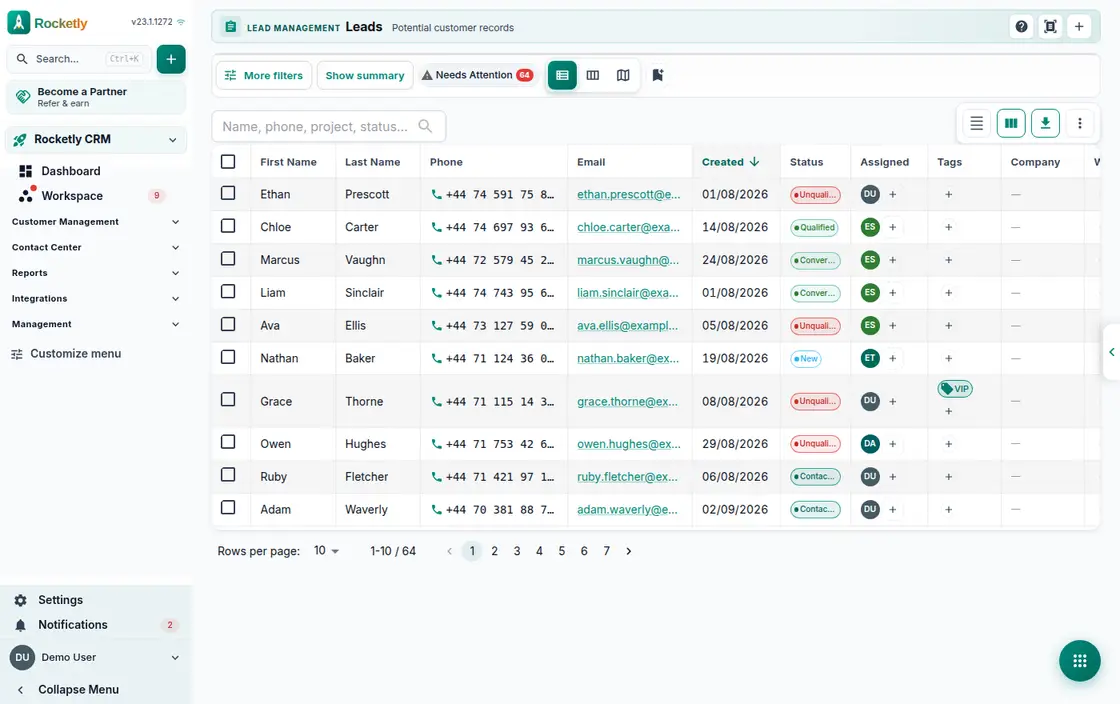
What you can do
Scoring and score reasons
Choose between rules-based, ML-based or hybrid scoring. Every lead shows why it earned that score and what would move it up.
First response SLA
The card shows the time left to first response and flags the moment the SLA is breached. Compare a lead's response time with the organisation average.
Assignment and routing rules
A lead is assigned by hand, by rule or in bulk. Routing to a sales office and the unassigned filter sit on the same screen.
List, kanban and map
Open the same lead pool as a list, a kanban board or a map. Kanban columns follow the lead statuses you already work with.
Convert to contact or deal
Turn a qualified lead into a contact record, a sales opportunity or both at once. The field mapping step lets you decide what goes where.
Duplicate clean-up
Scan for duplicate groups matched by phone or email. Check the similarity, pick the primary record and merge the whole group into it.
A REAL SCENARIO
A real working day
The flow that helps a team decide before a meeting
After an ad campaign
Leads from the weekend campaign land in the list on Monday morning. In kanban view the team lead spots the cards whose first-response time is running out, bulk-assigns the ones with no owner, and the highest-scoring leads get called first. By the end of the day the qualified ones become opportunities.
Who is it for?
It fits sales teams collecting leads from several sources that want visible distribution and fewer follow-up gaps.
SETUP PLAN
How to start
Define required lead fields and the ownership rule first.
Simplify stages around the customer's real buying process.
Compare score and follow-up outcomes with loss reasons each month.
Content verified:
ANSWER CENTER
Frequently asked questions
Explore the questions teams ask before deciding, with short and direct answers.
Open a question to see the scope of the product and its practical boundaries.
What exactly does Lead Management do?
Lead Management keeps prospect information, ownership, stage, and follow-up actions on the same record. Scoring and priority signals make the next opportunity to review a discussable team decision.
Who is Lead Management for?
It fits sales teams collecting leads from several sources that want visible distribution and fewer follow-up gaps.
What can I do with Lead Management?
Scoring and score reasons: Choose between rules-based, ML-based or hybrid scoring. Every lead shows why it earned that score and what would move it up. First response SLA: The card shows the time left to first response and flags the moment the SLA is breached. Compare a lead's response time with the organisation average. Assignment and routing rules: A lead is assigned by hand, by rule or in bulk. Routing to a sales office and the unassigned filter sit on the same screen. List, kanban and map: Open the same lead pool as a list, a kanban board or a map. Kanban columns follow the lead statuses you already work with. Convert to contact or deal: Turn a qualified lead into a contact record, a sales opportunity or both at once. The field mapping step lets you decide what goes where. Duplicate clean-up: Scan for duplicate groups matched by phone or email. Check the similarity, pick the primary record and merge the whole group into it.
What does Lead Management look like on a real working day?
After an ad campaign. Leads from the weekend campaign land in the list on Monday morning. In kanban view the team lead spots the cards whose first-response time is running out, bulk-assigns the ones with no owner, and the highest-scoring leads get called first. By the end of the day the qualified ones become opportunities.
How should a team start with Lead Management?
Define required lead fields and the ownership rule first. Simplify stages around the customer's real buying process. Compare score and follow-up outcomes with loss reasons each month.
What does Lead Management not replace?
A score is a working signal about purchase likelihood, not a conversion guarantee, and it cannot repair incomplete or incorrect input data.
Which industry was Lead Management verified for?
The verified industry scenario for Lead Management is Real Estate. The industry page shows that end-to-end workflow. Other products used alongside it in the same scenario: Sales Pipeline.
Used together in the same industry
Start using Rocketly for free
Bring your team together in one CRM; no card needed to set it up.