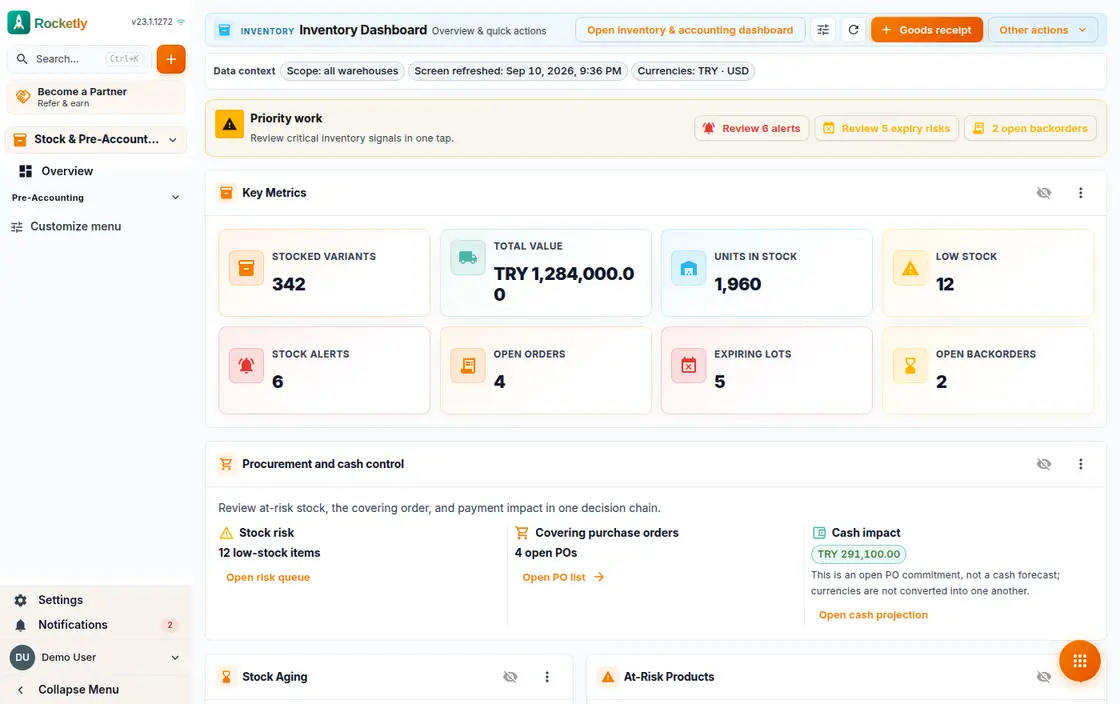
What you can do
Stock list by SKU
One table lists each variant's SKU, its warehouse, the quantity on hand and its last movement. A single filter isolates the ones running low.
Main, branch and transit
Work with main, branch, transit and virtual warehouse types; each keeps its own stock level, and a new warehouse opens straight from the list.
Receipts, transfers and counts
Goods receipts, transfers between warehouses and count corrections are all logged as movements. Each row shows quantity, unit cost and source document.
Low stock alerts
When available stock falls to the reorder threshold you get a low stock alert, and an out of stock alert at zero. They all collect on the alerts page.
Reordering and purchasing
Items below threshold turn into reorder suggestions; open a purchase order from one and follow partial or complete delivery from its status.
Counts, lots and expiry
Open a counting session and count the items, follow lot and serial numbers in the register, and see approaching expiry dates in a queue of their own.
A REAL SCENARIO
A real working day
The flow that helps a team decide before a meeting
A morning shipment to the branch
In the morning the warehouse lead opens the stock list, isolates the items about to run out at the branch with the low stock filter and enters a transfer from the main warehouse. In the afternoon the items still below threshold become a purchase order straight from the reorder suggestions.
Who is it for?
It suits teams that need visibility across multiple products or warehouses and want counts and sales information in the same operating rhythm.
SETUP PLAN
How to start
Simplify the product, warehouse, and movement-type vocabulary first.
Define owners for counting and transfers.
Review critical differences as exceptions in the daily operations meeting.
Content verified:
ANSWER CENTER
Frequently asked questions
Explore the questions teams ask before deciding, with short and direct answers.
Open a question to see the scope of the product and its practical boundaries.
What exactly does Inventory Management do?
Inventory Management helps organize warehouse and product movements in a shared operational view. Teams can see which movement explains a quantity and discuss sales and supply decisions earlier.
Who is Inventory Management for?
It suits teams that need visibility across multiple products or warehouses and want counts and sales information in the same operating rhythm.
What can I do with Inventory Management?
Stock list by SKU: One table lists each variant's SKU, its warehouse, the quantity on hand and its last movement. A single filter isolates the ones running low. Main, branch and transit: Work with main, branch, transit and virtual warehouse types; each keeps its own stock level, and a new warehouse opens straight from the list. Receipts, transfers and counts: Goods receipts, transfers between warehouses and count corrections are all logged as movements. Each row shows quantity, unit cost and source document. Low stock alerts: When available stock falls to the reorder threshold you get a low stock alert, and an out of stock alert at zero. They all collect on the alerts page. Reordering and purchasing: Items below threshold turn into reorder suggestions; open a purchase order from one and follow partial or complete delivery from its status. Counts, lots and expiry: Open a counting session and count the items, follow lot and serial numbers in the register, and see approaching expiry dates in a queue of their own.
What does Inventory Management look like on a real working day?
A morning shipment to the branch. In the morning the warehouse lead opens the stock list, isolates the items about to run out at the branch with the low stock filter and enters a transfer from the main warehouse. In the afternoon the items still below threshold become a purchase order straight from the reorder suggestions.
How should a team start with Inventory Management?
Simplify the product, warehouse, and movement-type vocabulary first. Define owners for counting and transfers. Review critical differences as exceptions in the daily operations meeting.
What does Inventory Management not replace?
The system does not replace physical counting or accurate movement entry. A missed transfer, late entry, or incorrect count will also make the digital view wrong.
Which industry was Inventory Management verified for?
The verified industry scenario for Inventory Management is Retail. The industry page shows that end-to-end workflow.
Start using Rocketly for free
Bring your team together in one CRM; no card needed to set it up.