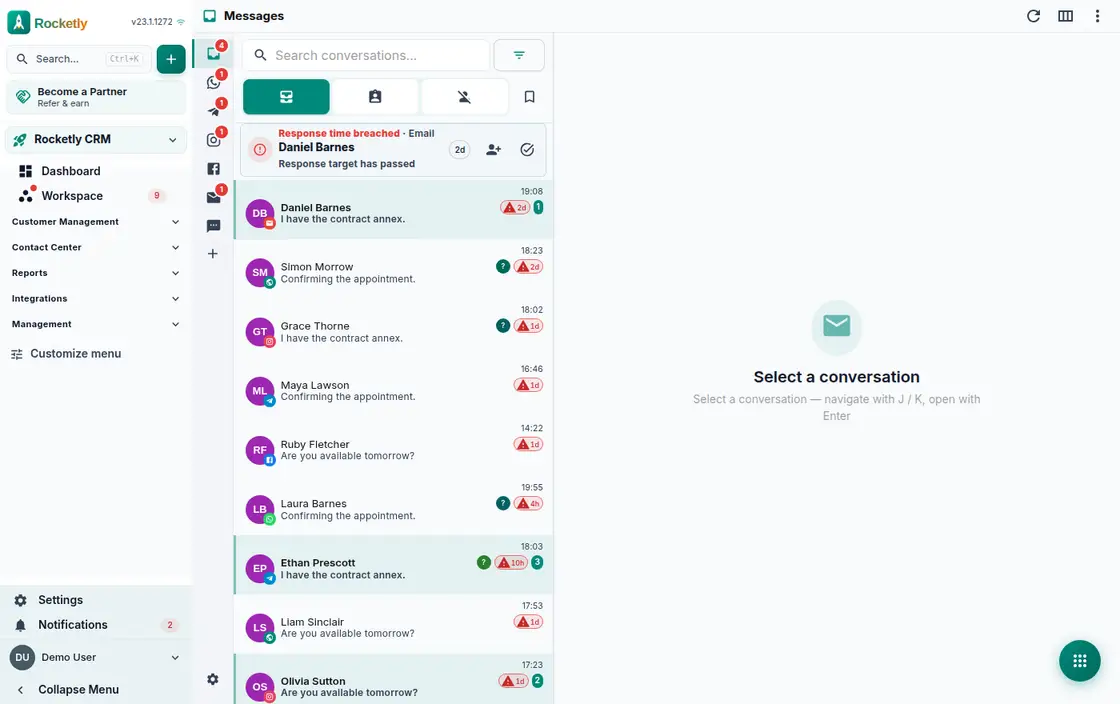
What you can do
Every channel in one inbox
Official WhatsApp, Instagram, Telegram, SMS and email flow into the same list. Adding a channel does not mean switching to another tab.
Auto-assign and routing
An incoming message lands with the right team or agent by rule. Channel, language, segment and required skills can all be conditions.
Case centre and SLA
Related conversations gather into one case and the ones at SLA risk surface first. Response-time trend and hourly activity live on their own screen.
Shared drafts and locking
Share a reply draft with the team, claim its ownership or release it. You can see who is writing on a conversation, so two replies never collide.
Snooze, tags, bulk actions
Snooze a conversation until tomorrow morning and tag it. Bulk assign and close show their impact first, and can be undone if it goes wrong.
Delivery state and WhatsApp window
Delivered and read states, plus the email delivery history including bounces, stay visible. When the WhatsApp free-form window closes you are sent to an approved template.
A REAL SCENARIO
A real working day
The flow that helps a team decide before a meeting
The pile-up on campaign day
After the announcement, messages pour in from WhatsApp, Instagram and email at once. Rule-based routing sends each conversation to the right team, and the ones at SLA risk rise to the top of the case centre. Thanks to draft locking, two agents never answer the same customer.
Who is it for?
It suits sales and support teams that receive a high message volume and need to follow one customer's conversations across channels in a single accountable flow.
SETUP PLAN
How to start
Connect the two busiest channels first.
Agree on team rules for assignment, labels, and resolution status.
During the first week, review unanswered and unowned conversations together.
Content verified:
ANSWER CENTER
Frequently asked questions
Explore the questions teams ask before deciding, with short and direct answers.
Open a question to see the scope of the product and its practical boundaries.
What exactly does Unified Inbox do?
Unified Inbox brings customer conversations from supported channels into one working view, so the owner, status, and next action stay connected to the conversation.
Who is Unified Inbox for?
It suits sales and support teams that receive a high message volume and need to follow one customer's conversations across channels in a single accountable flow.
What can I do with Unified Inbox?
Every channel in one inbox: Official WhatsApp, Instagram, Telegram, SMS and email flow into the same list. Adding a channel does not mean switching to another tab. Auto-assign and routing: An incoming message lands with the right team or agent by rule. Channel, language, segment and required skills can all be conditions. Case centre and SLA: Related conversations gather into one case and the ones at SLA risk surface first. Response-time trend and hourly activity live on their own screen. Shared drafts and locking: Share a reply draft with the team, claim its ownership or release it. You can see who is writing on a conversation, so two replies never collide. Snooze, tags, bulk actions: Snooze a conversation until tomorrow morning and tag it. Bulk assign and close show their impact first, and can be undone if it goes wrong. Delivery state and WhatsApp window: Delivered and read states, plus the email delivery history including bounces, stay visible. When the WhatsApp free-form window closes you are sent to an approved template.
What does Unified Inbox look like on a real working day?
The pile-up on campaign day. After the announcement, messages pour in from WhatsApp, Instagram and email at once. Rule-based routing sends each conversation to the right team, and the ones at SLA risk rise to the top of the case centre. Thanks to draft locking, two agents never answer the same customer.
How should a team start with Unified Inbox?
Connect the two busiest channels first. Agree on team rules for assignment, labels, and resolution status. During the first week, review unanswered and unowned conversations together.
What does Unified Inbox not replace?
Unified Inbox does not change a channel provider's delivery, template, or permission rules; it works only with data the integration is authorized to access.
Which industry was Unified Inbox verified for?
The verified industry scenario for Unified Inbox is Restaurant & Café. The industry page shows that end-to-end workflow.
Start using Rocketly for free
Bring your team together in one CRM; no card needed to set it up.