What you can do
Passwordless portal sign-in
The customer types their email address, clicks the sign-in link that arrives and lands in their portal. No password to remember, no account to reset.
Quotes, bookings and invoices
In the portal they view and sign the quotes shared with them, follow their planned appointments and invoice status, and download the invoice PDF.
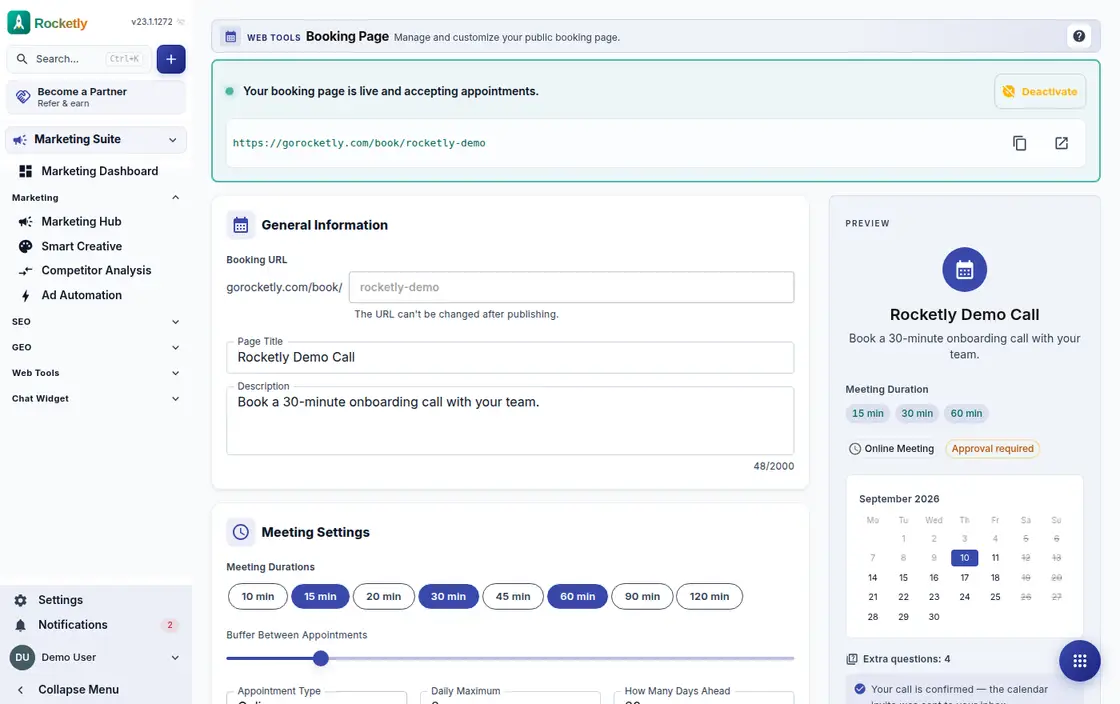
Public booking page
Publish a booking page on your own short address; the visitor picks a date, taps one of the available slots and confirms the appointment.
Guests manage their booking
From their own link the guest cancels the appointment or moves it to another time. They can add it to Google Calendar or download an .ics file.
File requests and shared folders
Ask a customer for files without making them open an account, and share a folder back. Both links can be password protected and the folder downloads as a ZIP.
Embedded on your own site
Paste the booking form's embed code into your own website; the live chat widget can sit on the same page, and its conversations land in your inbox.
A REAL SCENARIO
A real working day
The flow that helps a team decide before a meeting
A booking that arrives on Saturday
With the office closed, a visitor picks a Monday afternoon slot on the booking page and sees the confirmation right away. On Monday morning the team finds the appointment in the calendar, the customer moves the time from that same link, and signs the quote in the portal.
Who is it for?
It suits businesses that want to present project, quote, document, or status information consistently and reduce repetitive access requests to support.
SETUP PLAN
How to start
Define a limited list of information customers genuinely need to see.
Set access, expiry, and support ownership.
Test the sharing and feedback flow with the first customer group.
Content verified:
ANSWER CENTER
Frequently asked questions
Explore the questions teams ask before deciding, with short and direct answers.
Open a question to see the scope of the product and its practical boundaries.
What exactly does Customer Portal do?
Customer Portal gives customers controlled access to shared information and actions about their own process. Instead of moving every simple information request through messages, the team can provide a secure common surface.
Who is Customer Portal for?
It suits businesses that want to present project, quote, document, or status information consistently and reduce repetitive access requests to support.
What can I do with Customer Portal?
Passwordless portal sign-in: The customer types their email address, clicks the sign-in link that arrives and lands in their portal. No password to remember, no account to reset. Quotes, bookings and invoices: In the portal they view and sign the quotes shared with them, follow their planned appointments and invoice status, and download the invoice PDF. Public booking page: Publish a booking page on your own short address; the visitor picks a date, taps one of the available slots and confirms the appointment. Guests manage their booking: From their own link the guest cancels the appointment or moves it to another time. They can add it to Google Calendar or download an .ics file. File requests and shared folders: Ask a customer for files without making them open an account, and share a folder back. Both links can be password protected and the folder downloads as a ZIP. Embedded on your own site: Paste the booking form's embed code into your own website; the live chat widget can sit on the same page, and its conversations land in your inbox.
What does Customer Portal look like on a real working day?
A booking that arrives on Saturday. With the office closed, a visitor picks a Monday afternoon slot on the booking page and sees the confirmation right away. On Monday morning the team finds the appointment in the calendar, the customer moves the time from that same link, and signs the quote in the portal.
How should a team start with Customer Portal?
Define a limited list of information customers genuinely need to see. Set access, expiry, and support ownership. Test the sharing and feedback flow with the first customer group.
What does Customer Portal not replace?
A portal does not replace authentication and access policy. Which customer can see which record must be governed by explicit authorization rules.
Which industry was Customer Portal verified for?
The verified industry scenario for Customer Portal is Construction. The industry page shows that end-to-end workflow. Other products used alongside it in the same scenario: Quotes and Contracts, Construction CRM.
Used together in the same industry
Start using Rocketly for free
Bring your team together in one CRM; no card needed to set it up.