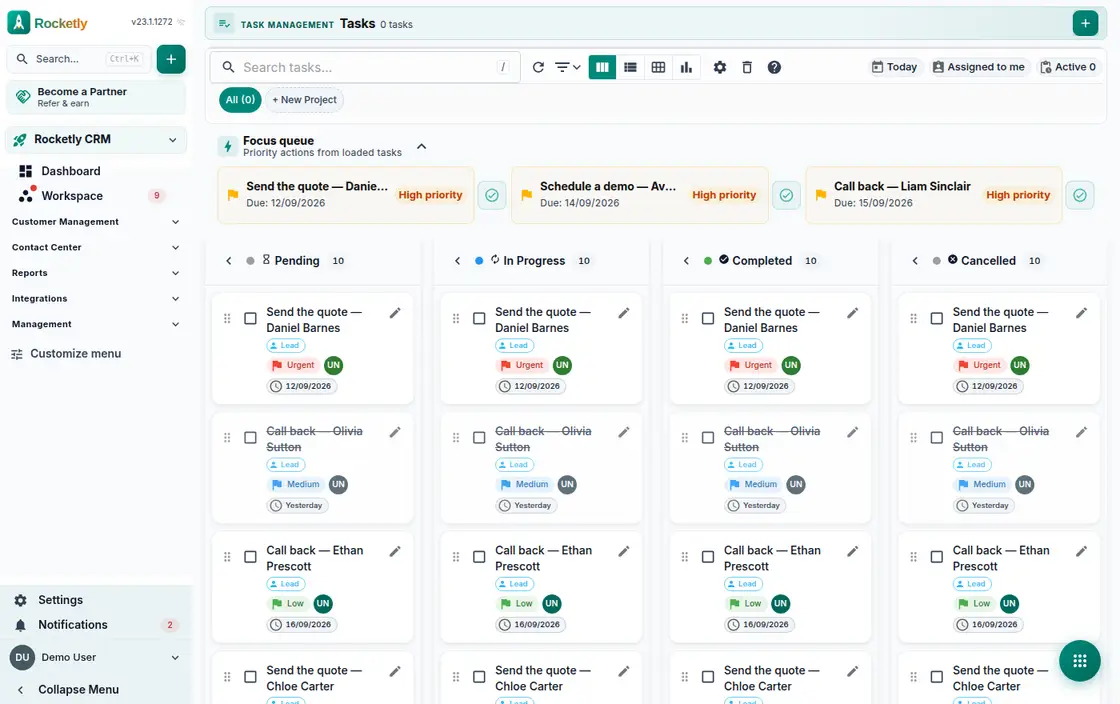
What you can do
Subtasks, comments and files
Break a task into subtasks, attach files and leave comments. The card itself shows how many of the subtasks are already done.
Kanban, Gantt and calendar
Open the same task list as a kanban board, a Gantt timeline or a calendar, where deadlines and planned work are shown separately.
Owner and linked record
Several people can be assigned to a task and the first one becomes the primary owner. A task links to a lead, an opportunity or another record.
Dependencies and time tracking
Define that one task depends on another and log the time spent. With an hourly rate the tracked hours turn into an estimated amount.
Projects and default assignee
Tasks are grouped into projects, each with an owner and a default assignee. A project switched to passive accepts no new tasks.
Due alerts and focus queue
Tasks due today, already overdue or with a reminder coming up arrive as notifications, and the focus queue pulls the late ones to the front.
A REAL SCENARIO
A real working day
The flow that helps a team decide before a meeting
Tracking an onboarding project
A new customer onboarding is opened as a project and the work is split into subtasks across the team. Because the installation task depends on the training task, the order is clear on the Gantt timeline. Opening the focus queue in the morning, the team closes what is overdue and what is due today first.
Who is it for?
It suits teams that want clear ownership across customer requests, internal operations, or project work instead of relying only on personal reminders.
SETUP PLAN
How to start
Write the task around one expected outcome.
Do not assign work without an owner, due date, and linked record.
Review overdue tasks as a process exception, not a personal label.
Content verified:
ANSWER CENTER
Frequently asked questions
Explore the questions teams ask before deciding, with short and direct answers.
Open a question to see the scope of the product and its practical boundaries.
What exactly does Task Management do?
Task Management helps keep the owner, due date, and work context visible. The team turns intent expressed in a message into a followable commitment and reduces the risk that work disappears between people.
Who is Task Management for?
It suits teams that want clear ownership across customer requests, internal operations, or project work instead of relying only on personal reminders.
What can I do with Task Management?
Subtasks, comments and files: Break a task into subtasks, attach files and leave comments. The card itself shows how many of the subtasks are already done. Kanban, Gantt and calendar: Open the same task list as a kanban board, a Gantt timeline or a calendar, where deadlines and planned work are shown separately. Owner and linked record: Several people can be assigned to a task and the first one becomes the primary owner. A task links to a lead, an opportunity or another record. Dependencies and time tracking: Define that one task depends on another and log the time spent. With an hourly rate the tracked hours turn into an estimated amount. Projects and default assignee: Tasks are grouped into projects, each with an owner and a default assignee. A project switched to passive accepts no new tasks. Due alerts and focus queue: Tasks due today, already overdue or with a reminder coming up arrive as notifications, and the focus queue pulls the late ones to the front.
What does Task Management look like on a real working day?
Tracking an onboarding project. A new customer onboarding is opened as a project and the work is split into subtasks across the team. Because the installation task depends on the training task, the order is clear on the Gantt timeline. Opening the focus queue in the morning, the team closes what is overdue and what is due today first.
How should a team start with Task Management?
Write the task around one expected outcome. Do not assign work without an owner, due date, and linked record. Review overdue tasks as a process exception, not a personal label.
What does Task Management not replace?
Creating a task does not prove work is complete or quality-approved. Priority, capacity, and acceptance criteria must still be managed explicitly by the team.
Which industry was Task Management verified for?
The verified industry scenario for Task Management is Human Resources. The industry page shows that end-to-end workflow.
Start using Rocketly for free
Bring your team together in one CRM; no card needed to set it up.