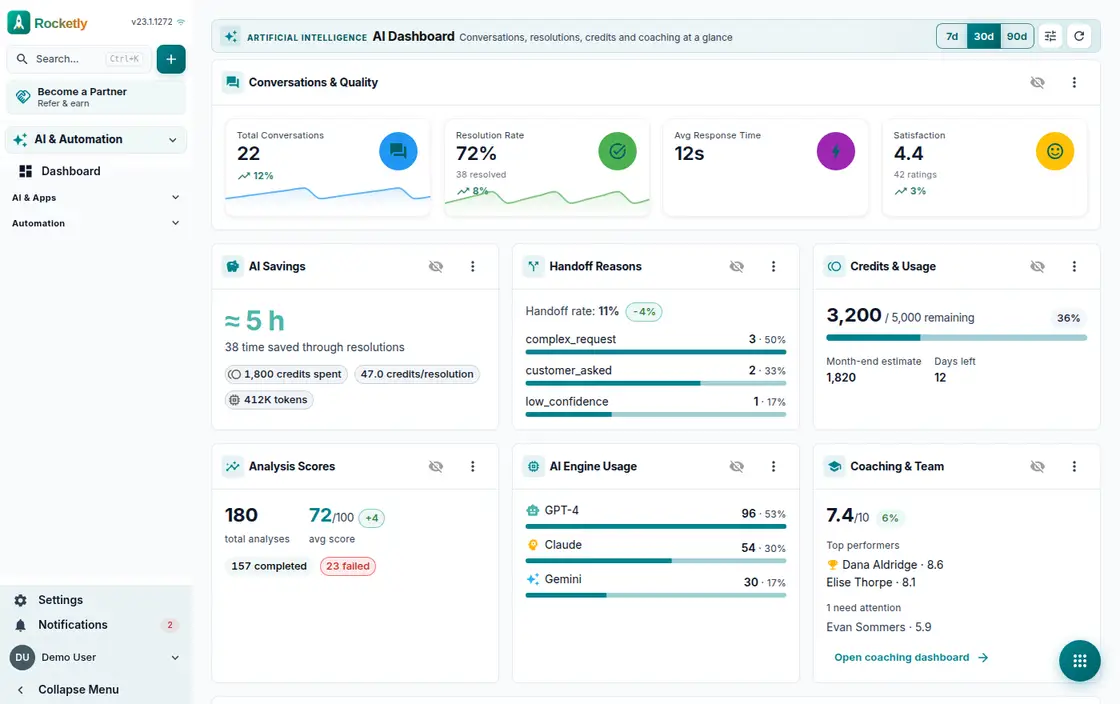
What you can do
CRM Chat
How many leads this week, how the pipeline is moving, which tasks are overdue, which deals are stale — start from ready-made questions or type your own.
AI context passport
Before the answer you can see which record, how many masked fields and how much message history the assistant reads. Permission scope is enforced server-side.
Records straight from an answer
Create a task, note, lead, appointment or quote without leaving the chat. What the conversation concludes turns directly into a CRM record.
Save and share answers
Add a useful answer to saved answers, share it with the organization, or download it as a PDF. Nobody has to ask the same question twice.
AI Sales Assistant
Hot leads, pending follow-ups and risk alerts sit in separate tabs. The forecast tab and the AI call script get you ready before you dial.
AI dashboard and credits
Conversation counts, resolution rate, cost analysis and usage trend gather on one dashboard, while credit alerts flag the situation before month end.
A REAL SCENARIO
A real working day
The flow that helps a team decide before a meeting
Monday morning sales meeting
Before the meeting the sales manager opens the AI dashboard and asks for the pipeline summary and the stale deals. The answer gets saved and shared with the team, and risky leads become tasks from the same chat. She walks in with answers instead of waiting on a report.
Who is it for?
It suits teams that answer similar questions across several channels, want a faster first response, and need to make the point requiring human judgment obvious.
SETUP PLAN
How to start
Start with one customer-question type and one reliable knowledge source.
Define which draft fields a teammate must verify before sending.
Review answer quality alongside misdirection risk and time to resolution.
Content verified:
ANSWER CENTER
Frequently asked questions
Explore the questions teams ask before deciding, with short and direct answers.
Open a question to see the scope of the product and its practical boundaries.
What exactly does AI Assistant do?
AI Assistant brings customer context and the information defined by your team into one working surface so responses can be drafted faster. A teammate reviews the draft before it is sent and keeps control of the final voice.
Who is AI Assistant for?
It suits teams that answer similar questions across several channels, want a faster first response, and need to make the point requiring human judgment obvious.
What can I do with AI Assistant?
CRM Chat: How many leads this week, how the pipeline is moving, which tasks are overdue, which deals are stale — start from ready-made questions or type your own. AI context passport: Before the answer you can see which record, how many masked fields and how much message history the assistant reads. Permission scope is enforced server-side. Records straight from an answer: Create a task, note, lead, appointment or quote without leaving the chat. What the conversation concludes turns directly into a CRM record. Save and share answers: Add a useful answer to saved answers, share it with the organization, or download it as a PDF. Nobody has to ask the same question twice. AI Sales Assistant: Hot leads, pending follow-ups and risk alerts sit in separate tabs. The forecast tab and the AI call script get you ready before you dial. AI dashboard and credits: Conversation counts, resolution rate, cost analysis and usage trend gather on one dashboard, while credit alerts flag the situation before month end.
What does AI Assistant look like on a real working day?
Monday morning sales meeting. Before the meeting the sales manager opens the AI dashboard and asks for the pipeline summary and the stale deals. The answer gets saved and shared with the team, and risky leads become tasks from the same chat. She walks in with answers instead of waiting on a report.
How should a team start with AI Assistant?
Start with one customer-question type and one reliable knowledge source. Define which draft fields a teammate must verify before sending. Review answer quality alongside misdirection risk and time to resolution.
What does AI Assistant not replace?
AI Assistant does not replace commercial, legal, or sensitive customer decisions that require human approval, and it does not claim certainty about data it cannot access.
Which industry was AI Assistant verified for?
The verified industry scenario for AI Assistant is E-Commerce. The industry page shows that end-to-end workflow. Other products used alongside it in the same scenario: Workflow Builder.
Used together in the same industry
Start using Rocketly for free
Bring your team together in one CRM; no card needed to set it up.