What you can do
A library of ready reports
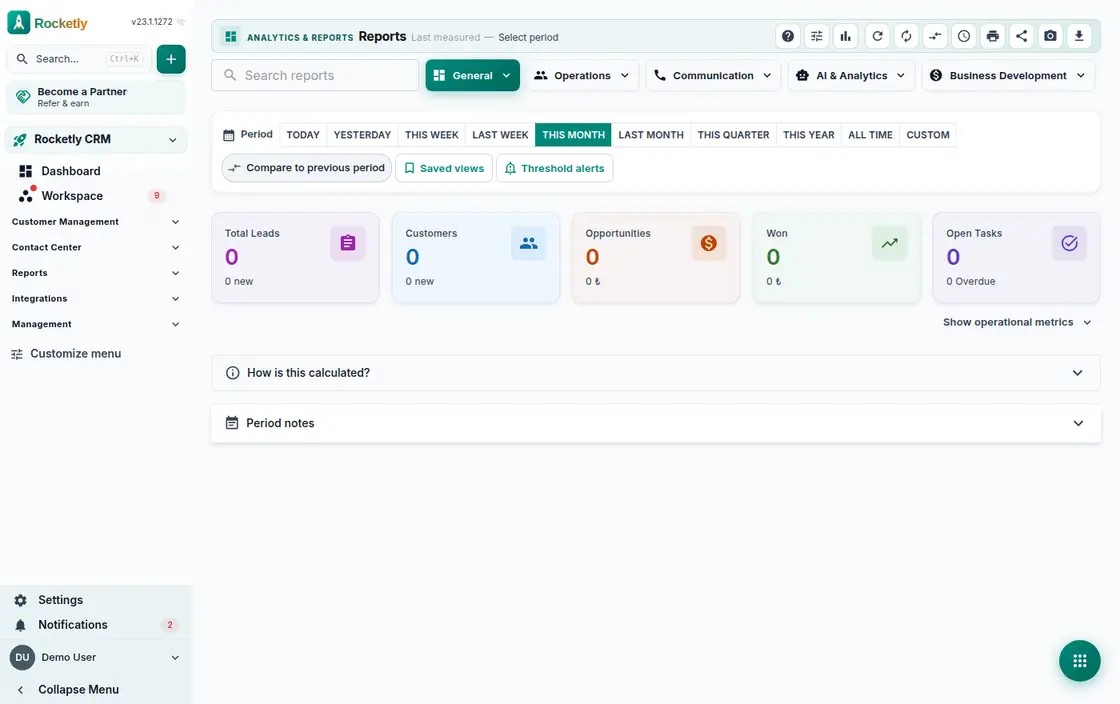
Reports such as loss analysis and pipeline velocity are grouped into categories. You select the report, set the period and read the result on screen.
Sales analytics cards
Win/loss analysis, sales velocity, revenue forecast, RFM segmentation and the team leaderboard each sit on their own card, side by side.
Arrange the dashboard yourself
Widget settings decide which cards appear and how large they are. Resetting the layout or opening a card full screen takes a single move.
See behind the number
A "How is this calculated?" note explains the scope, and "—" means not measured. The last measurement time and a "why changed" breakdown sit right beside it.
Custom report builder
Choose the data source, the grouping and the chart type to build a new report, then share it with the organization once it is ready.
Scheduled reports
You set the frequency and the recipient emails. There are options to send only when the content changes and to collect one digest group into a single email.
A REAL SCENARIO
A real working day
The flow that helps a team decide before a meeting
The Monday management meeting
Before the meeting the sales manager opens the report and spots a sudden rise in the loss analysis. The "why changed" breakdown shows it all comes from a single source. She schedules the same report weekly to the team list, and nobody assembles the table by hand again.
Who is it for?
It suits leaders who want to review sales, channel, or team performance on a regular rhythm without losing the data across separate exports.
SETUP PLAN
How to start
Choose three core metrics for one decision meeting.
Make the owner, period, and source of each metric visible.
Close the report with a next action and review date.
Content verified:
ANSWER CENTER
Frequently asked questions
Explore the questions teams ask before deciding, with short and direct answers.
Open a question to see the scope of the product and its practical boundaries.
What exactly does Analytics do?
Analytics brings operational data into shared report views so teams can discuss change, bottlenecks, and areas needing follow-up in one frame. A report is evidence for a decision, not the decision itself.
Who is Analytics for?
It suits leaders who want to review sales, channel, or team performance on a regular rhythm without losing the data across separate exports.
What can I do with Analytics?
A library of ready reports: Reports such as loss analysis and pipeline velocity are grouped into categories. You select the report, set the period and read the result on screen. Sales analytics cards: Win/loss analysis, sales velocity, revenue forecast, RFM segmentation and the team leaderboard each sit on their own card, side by side. Arrange the dashboard yourself: Widget settings decide which cards appear and how large they are. Resetting the layout or opening a card full screen takes a single move. See behind the number: A "How is this calculated?" note explains the scope, and "—" means not measured. The last measurement time and a "why changed" breakdown sit right beside it. Custom report builder: Choose the data source, the grouping and the chart type to build a new report, then share it with the organization once it is ready. Scheduled reports: You set the frequency and the recipient emails. There are options to send only when the content changes and to collect one digest group into a single email.
What does Analytics look like on a real working day?
The Monday management meeting. Before the meeting the sales manager opens the report and spots a sudden rise in the loss analysis. The "why changed" breakdown shows it all comes from a single source. She schedules the same report weekly to the team list, and nobody assembles the table by hand again.
How should a team start with Analytics?
Choose three core metrics for one decision meeting. Make the owner, period, and source of each metric visible. Close the report with a next action and review date.
What does Analytics not replace?
Analytics does not repair incomplete records or present forecasts as certainty. A metric change alone is not proof of cause without context and data-quality review.
Which industry was Analytics verified for?
The verified industry scenario for Analytics is Finance. The industry page shows that end-to-end workflow.
Start using Rocketly for free
Bring your team together in one CRM; no card needed to set it up.