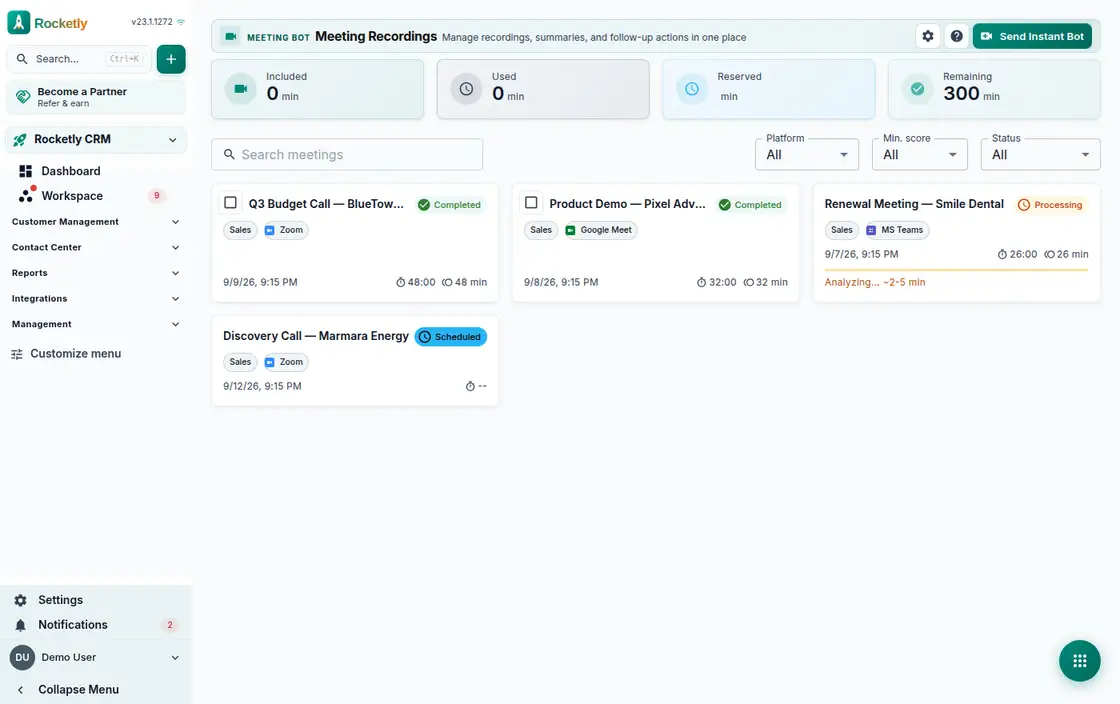
What you can do
Summary, decisions and action items
Every session is broken out into a summary, the decisions made, action items and the topics discussed. No more arguing over who took notes.
Action items become tasks
Select action items and turn them into tasks in one move; the owner and due date travel with the task, so follow-up stays inside the CRM.
Searchable transcript
Search the full transcript and review speaker metrics and interruptions. When a speaker is matched incorrectly you can correct it by hand.
Meeting score and coaching
Each session is assessed with a score, red flags, strengths and improvement areas, so internal coaching rests on a concrete record.
Zoom, Meet and Teams
The bot joins a scheduled meeting or is sent instantly into a call already under way. Calendar invitations can also be imported from an .ics file.
Consent, retention and privacy
Requiring participant consent, the retention period, allowed domains and erasing personal data all stay in the administrator's hands.
A REAL SCENARIO
A real working day
The flow that helps a team decide before a meeting
Weekly customer calls
A sales team runs twelve calls a week and the notes stay in individual notebooks. Once the bot joins each call and extracts the summary and decisions, the team lead sees on Monday morning, from a single list, who committed to what. Action items still open become tasks from the same screen.
Who is it for?
It suits teams that want to capture decisions and next steps consistently in customer calls, project reviews, or internal coordination meetings.
SETUP PLAN
How to start
Set recording consent and which meetings are in scope.
Agree on the decision and task format the summary must capture.
After the meeting, confirm the note with the responsible person and connect it to tasks.
Content verified:
ANSWER CENTER
Frequently asked questions
Explore the questions teams ask before deciding, with short and direct answers.
Open a question to see the scope of the product and its practical boundaries.
What exactly does Meeting Bot do?
Meeting Bot helps turn conversation from permitted meetings into a recording, summary, and followable notes. Decisions and responsibilities no longer have to remain only in the memory of those who attended.
Who is Meeting Bot for?
It suits teams that want to capture decisions and next steps consistently in customer calls, project reviews, or internal coordination meetings.
What can I do with Meeting Bot?
Summary, decisions and action items: Every session is broken out into a summary, the decisions made, action items and the topics discussed. No more arguing over who took notes. Action items become tasks: Select action items and turn them into tasks in one move; the owner and due date travel with the task, so follow-up stays inside the CRM. Searchable transcript: Search the full transcript and review speaker metrics and interruptions. When a speaker is matched incorrectly you can correct it by hand. Meeting score and coaching: Each session is assessed with a score, red flags, strengths and improvement areas, so internal coaching rests on a concrete record. Zoom, Meet and Teams: The bot joins a scheduled meeting or is sent instantly into a call already under way. Calendar invitations can also be imported from an .ics file. Consent, retention and privacy: Requiring participant consent, the retention period, allowed domains and erasing personal data all stay in the administrator's hands.
What does Meeting Bot look like on a real working day?
Weekly customer calls. A sales team runs twelve calls a week and the notes stay in individual notebooks. Once the bot joins each call and extracts the summary and decisions, the team lead sees on Monday morning, from a single list, who committed to what. Action items still open become tasks from the same screen.
How should a team start with Meeting Bot?
Set recording consent and which meetings are in scope. Agree on the decision and task format the summary must capture. After the meeting, confirm the note with the responsible person and connect it to tasks.
What does Meeting Bot not replace?
A meeting summary is not an official minute or legal record. The meeting owner must manage attendance, recording consent, and the sharing of sensitive information.
Which industry was Meeting Bot verified for?
The verified industry scenario for Meeting Bot is Consulting. The industry page shows that end-to-end workflow. Other products used alongside it in the same scenario: Prospecting.
Used together in the same industry
Start using Rocketly for free
Bring your team together in one CRM; no card needed to set it up.