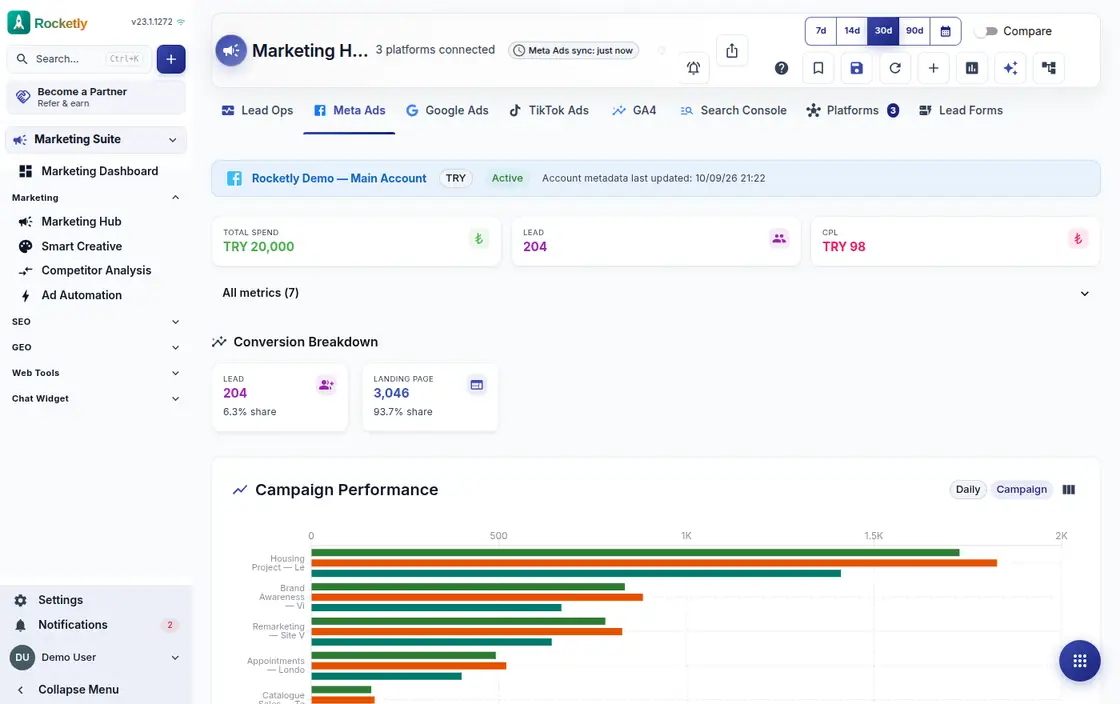
What you can do
Campaign creation studio
Campaign name, daily budget, objective and bid strategy sit in one form; pick an objective such as lead generation and save the draft.
Plans and approval centre
A draft goes for approval and is approved or rejected; an approved campaign is created paused on the platform, so nothing goes live by accident.
Drip sequences
Set up a sequence that starts when a lead is created; email, WhatsApp and delay steps are lined up in order and the sequence runs itself.
Sequence rules and quiet hours
A reply stops the sequence and messages stay outside quiet hours; you set a daily message cap per person and sending on business days only.
WhatsApp campaigns
Choose a template and schedule the campaign; the start time and the delivered and read counts appear on the same card as sending proceeds.
Email template library
Write the subject and body once, check it in preview, try it with a test send, and make the template you use most the default.
A REAL SCENARIO
A real working day
The flow that helps a team decide before a meeting
The week after a trade fair
The team comes back from a fair and enters the business cards it collected. A sequence tied to the lead-created trigger sends the email on day one and, after a delay step, the WhatsApp message; anyone who replies leaves the sequence. The marketer only handles the people who answered.
Who is it for?
It suits marketing and sales teams that want to evaluate advertising beyond clicks by connecting it to lead and sales follow-through.
SETUP PLAN
How to start
Choose which campaign outcome is meaningful in the CRM first.
Connect the channel metric to lead stage and ownership.
Check data freshness and exceptions before changing budget.
Content verified:
ANSWER CENTER
Frequently asked questions
Explore the questions teams ask before deciding, with short and direct answers.
Open a question to see the scope of the product and its practical boundaries.
What exactly does Marketing Hub do?
Marketing Hub helps review campaign signals next to CRM context, so the team can discuss cost, lead quality, and follow-up outcome without losing the thread across separate dashboards.
Who is Marketing Hub for?
It suits marketing and sales teams that want to evaluate advertising beyond clicks by connecting it to lead and sales follow-through.
What can I do with Marketing Hub?
Campaign creation studio: Campaign name, daily budget, objective and bid strategy sit in one form; pick an objective such as lead generation and save the draft. Plans and approval centre: A draft goes for approval and is approved or rejected; an approved campaign is created paused on the platform, so nothing goes live by accident. Drip sequences: Set up a sequence that starts when a lead is created; email, WhatsApp and delay steps are lined up in order and the sequence runs itself. Sequence rules and quiet hours: A reply stops the sequence and messages stay outside quiet hours; you set a daily message cap per person and sending on business days only. WhatsApp campaigns: Choose a template and schedule the campaign; the start time and the delivered and read counts appear on the same card as sending proceeds. Email template library: Write the subject and body once, check it in preview, try it with a test send, and make the template you use most the default.
What does Marketing Hub look like on a real working day?
The week after a trade fair. The team comes back from a fair and enters the business cards it collected. A sequence tied to the lead-created trigger sends the email on day one and, after a delay step, the WhatsApp message; anyone who replies leaves the sequence. The marketer only handles the people who answered.
How should a team start with Marketing Hub?
Choose which campaign outcome is meaningful in the CRM first. Connect the channel metric to lead stage and ownership. Check data freshness and exceptions before changing budget.
What does Marketing Hub not replace?
Marketing Hub does not guarantee ad results, ROAS, or budget efficiency. Spend and publishing decisions must remain governed by account permissions and team approval.
Which industry was Marketing Hub verified for?
The verified industry scenario for Marketing Hub is Advertising Agency. The industry page shows that end-to-end workflow. Other products used alongside it in the same scenario: Ads Automation.
Used together in the same industry
Start using Rocketly for free
Bring your team together in one CRM; no card needed to set it up.