What you can do
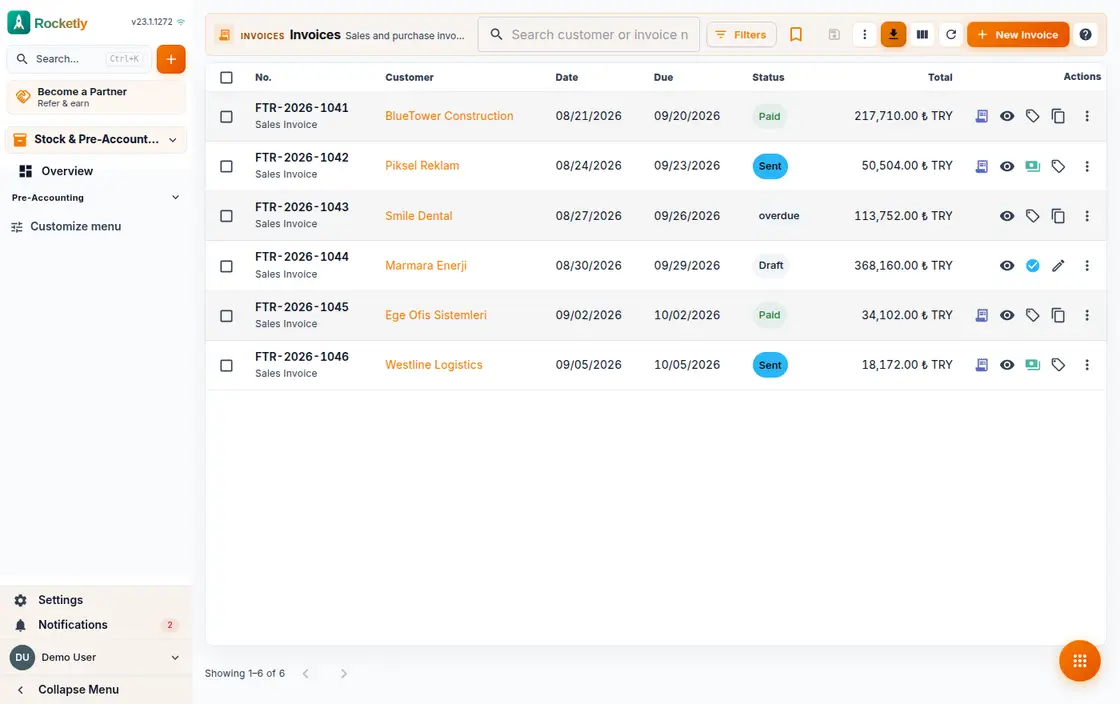
Sales and purchase invoices
Add invoice lines, leave the document as a draft, then finalize it when you are ready. Sales and purchase invoices sit in the same list.
E-Invoice and e-Archive
Send a finalized invoice through your provider as an e-Invoice or e-Archive and check its status on the same screen. Bulk sending is there too.
Collections and payments
Open an invoice and enter the collection amount and method; partial collections are recorded too, and the remaining balance updates on the invoice.
Cash, bank and cheques
Track cash and bank accounts, transfers between them and the cheque and note portfolio. Recording a collection creates the account movement for you.
Account cards and aging
Every customer and supplier has one card with its open balance, movement list and statement. Receivables are grouped by how many days they are late.
Import your existing data
Bring contacts, invoices and expenses in from a file. A simulation runs first, so you see what will be created before anything is, and skip duplicates.
A REAL SCENARIO
A real working day
The flow that helps a team decide before a meeting
Collections round at month start
On the first morning of the month the office manager opens the account cards, filters overdue balances by aging bucket and builds a call list. Whatever is promised on the phone is recorded against the invoice that same day, and the cash movement follows on its own.
Who is it for?
It suits businesses that want to connect CRM sales and customer follow-up with invoicing and a basic financial flow.
SETUP PLAN
How to start
Standardize document number, status, and customer matching first.
Separate collection and approval ownership.
At period end, reconcile exceptions together with the accounting process.
Content verified:
ANSWER CENTER
Frequently asked questions
Explore the questions teams ask before deciding, with short and direct answers.
Open a question to see the scope of the product and its practical boundaries.
What exactly does Pre-Accounting do?
Pre-Accounting helps keep quotes, invoices, and operational finance information next to the customer process. The team can more easily see which document, collection step, or record is missing in commercial follow-through.
Who is Pre-Accounting for?
It suits businesses that want to connect CRM sales and customer follow-up with invoicing and a basic financial flow.
What can I do with Pre-Accounting?
Sales and purchase invoices: Add invoice lines, leave the document as a draft, then finalize it when you are ready. Sales and purchase invoices sit in the same list. E-Invoice and e-Archive: Send a finalized invoice through your provider as an e-Invoice or e-Archive and check its status on the same screen. Bulk sending is there too. Collections and payments: Open an invoice and enter the collection amount and method; partial collections are recorded too, and the remaining balance updates on the invoice. Cash, bank and cheques: Track cash and bank accounts, transfers between them and the cheque and note portfolio. Recording a collection creates the account movement for you. Account cards and aging: Every customer and supplier has one card with its open balance, movement list and statement. Receivables are grouped by how many days they are late. Import your existing data: Bring contacts, invoices and expenses in from a file. A simulation runs first, so you see what will be created before anything is, and skip duplicates.
What does Pre-Accounting look like on a real working day?
Collections round at month start. On the first morning of the month the office manager opens the account cards, filters overdue balances by aging bucket and builds a call list. Whatever is promised on the phone is recorded against the invoice that same day, and the cash movement follows on its own.
How should a team start with Pre-Accounting?
Standardize document number, status, and customer matching first. Separate collection and approval ownership. At period end, reconcile exceptions together with the accounting process.
What does Pre-Accounting not replace?
Pre-accounting does not replace tax, statutory books, legal decisions, or professional accounting advice. Official obligations must be handled with qualified experts and current law.
Which industry was Pre-Accounting verified for?
The verified industry scenario for Pre-Accounting is Accounting. The industry page shows that end-to-end workflow.
Start using Rocketly for free
Bring your team together in one CRM; no card needed to set it up.