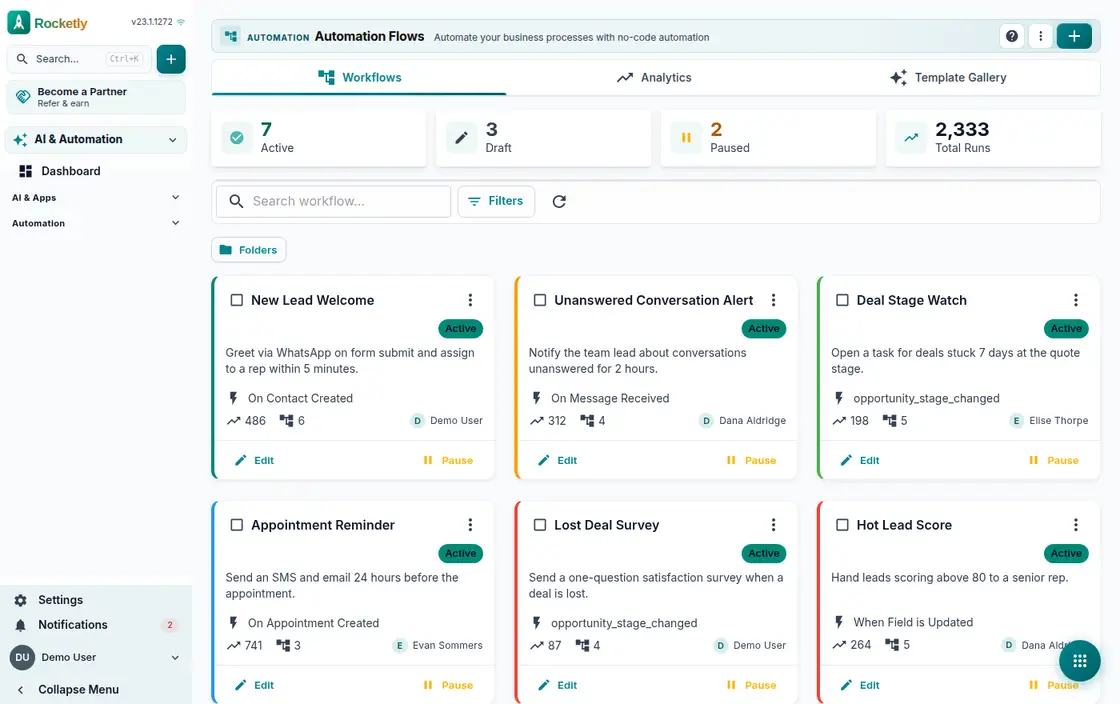
What you can do
Trigger, condition, action
You pick a trigger on the canvas first, then add condition and action steps. A multi-branch node splits the same flow into separate paths.
A broad action library
Sending a WhatsApp Business template, assigning to a team, notifying a team, waiting and calling an HTTP webhook all ship ready to be lined up.
Ready templates or AI setup
Pick one of the ready templates and use it, or describe what you want and let the AI builder assemble the flow and hand it back for editing.
Test before going live
Simulation performs no real operations; a real test and a webhook dry run show the outcome. The Problem Center catches incomplete configuration early.
Execution history and logs
Step logs and the result of every execution are kept. Workflow Health and the Queue Manager help you find stuck work and retry it.
Limits and manager approval
Per-person limits and working hours prevent a flood of messages. On critical steps you name the approver and set the timeout yourself.
A REAL SCENARIO
A real working day
The flow that helps a team decide before a meeting
A new lead from a form
A lead arrives from the form on Friday evening while the team is at home. The flow fires, the WhatsApp template goes out, the record is assigned to the team on duty and a note is left. On Monday the rep starts with a lead already greeted and already owned.
Who is it for?
It suits teams that want to standardize recurring tasks, notifications, routing, or customer follow-up without writing code.
SETUP PLAN
How to start
Break one process into start, decision, and outcome steps.
Use one trigger and one measurable outcome in the first version.
Test the failure path and responsible owner before publishing.
Content verified:
ANSWER CENTER
Frequently asked questions
Explore the questions teams ask before deciding, with short and direct answers.
Open a question to see the scope of the product and its practical boundaries.
What exactly does Workflow Builder do?
Workflow Builder helps you define visually which condition is checked after an event and which next action follows. A process becomes a flow the team can read together instead of a hidden technical script.
Who is Workflow Builder for?
It suits teams that want to standardize recurring tasks, notifications, routing, or customer follow-up without writing code.
What can I do with Workflow Builder?
Trigger, condition, action: You pick a trigger on the canvas first, then add condition and action steps. A multi-branch node splits the same flow into separate paths. A broad action library: Sending a WhatsApp Business template, assigning to a team, notifying a team, waiting and calling an HTTP webhook all ship ready to be lined up. Ready templates or AI setup: Pick one of the ready templates and use it, or describe what you want and let the AI builder assemble the flow and hand it back for editing. Test before going live: Simulation performs no real operations; a real test and a webhook dry run show the outcome. The Problem Center catches incomplete configuration early. Execution history and logs: Step logs and the result of every execution are kept. Workflow Health and the Queue Manager help you find stuck work and retry it. Limits and manager approval: Per-person limits and working hours prevent a flood of messages. On critical steps you name the approver and set the timeout yourself.
What does Workflow Builder look like on a real working day?
A new lead from a form. A lead arrives from the form on Friday evening while the team is at home. The flow fires, the WhatsApp template goes out, the record is assigned to the team on duty and a note is left. On Monday the rep starts with a lead already greeted and already owned.
How should a team start with Workflow Builder?
Break one process into start, decision, and outcome steps. Use one trigger and one measurable outcome in the first version. Test the failure path and responsible owner before publishing.
What does Workflow Builder not replace?
Workflow Builder does not automatically cover every external-system behavior that requires custom development. Critical flows still need permission, failure, and rollback design.
Which industry was Workflow Builder verified for?
The verified industry scenario for Workflow Builder is E-Commerce. The industry page shows that end-to-end workflow. Other products used alongside it in the same scenario: AI Assistant.
Used together in the same industry
Start using Rocketly for free
Bring your team together in one CRM; no card needed to set it up.