What you can do
Ready-made template gallery
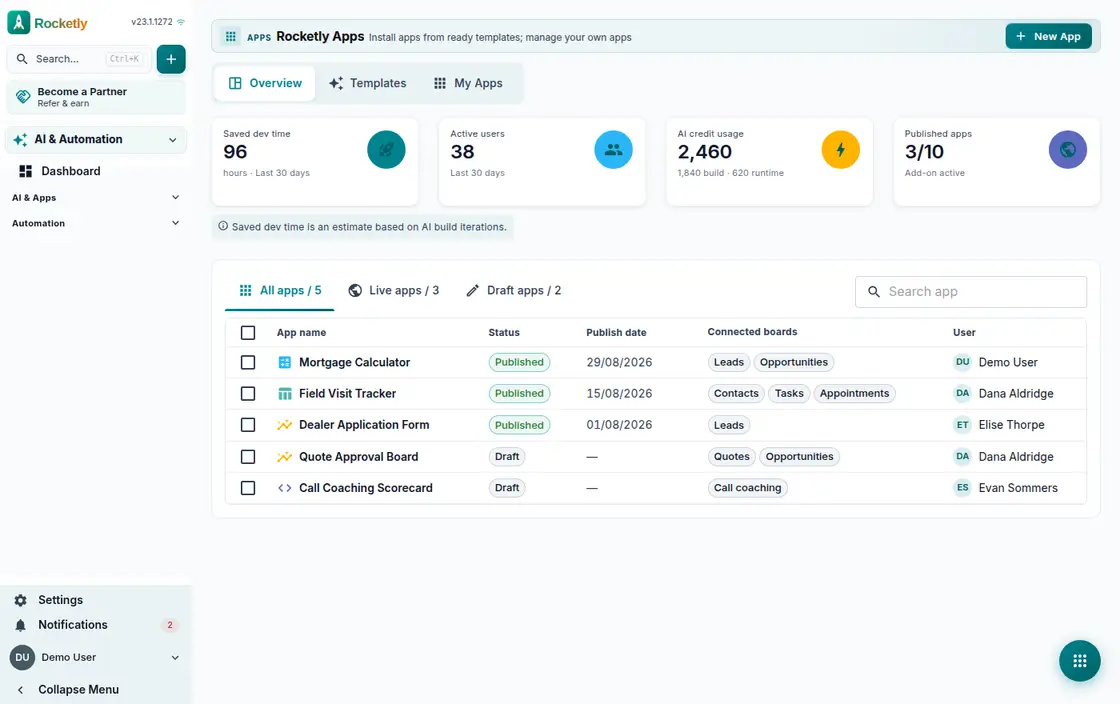
In the Rocketly Apps gallery you search templates by category, read what each app does and install it into your own workspace in a single step.
From idea to starting plan
Write your idea and it becomes a plan with pages and flow, an initial responsive wireframe and a design direction; gaps are flagged as transparent assumptions.
Surface and data boundary
Choose an internal team tool, a customer portal, a website or a custom mobile PWA; CRM data access is granted in a separate step and stays optional.
App Builder, step by step
Large requests are built step by step: a plan appears first, you skip any step you do not want and undo the last change with a single button.
Site Studio and staging
Add sections to a page; a change goes to a staging release first, gets checked and only then published. Domain and translation coverage sit on the same screen.
Pre-publish check
A checklist shows whether you are ready to publish, and whether the add-on that unlocks publishing is active is visible among the add-ons.
A REAL SCENARIO
A real working day
The flow that helps a team decide before a meeting
A clinic's appointment page
A clinic wants a page that collects appointment requests. The office manager writes the idea, the plan comes back as pages and a wireframe, she picks the website surface and leaves CRM access off. After arranging the sections she creates a staging release, clears the pre-publish check and publishes.
Who is it for?
It suits teams that want a dealer application portal, an internal approval app or a campaign page solved against the same customer record instead of moving to a separate tool.
SETUP PLAN
How to start
Start from one of the ready app or site templates.
Select, one by one, the CRM records an app may touch and whether it reads or writes.
Build the page from sections, send the release through approval and connect your domain.
Content verified:
ANSWER CENTER
Frequently asked questions
Explore the questions teams ask before deciding, with short and direct answers.
Open a question to see the scope of the product and its practical boundaries.
What exactly does Apps & Site Studio do?
Apps and Site Studio let you build internal apps and customer-facing pages on top of your CRM data without code. Every save leaves a version, publishing goes through review, and you choose explicitly which records an app may touch.
Who is Apps & Site Studio for?
It suits teams that want a dealer application portal, an internal approval app or a campaign page solved against the same customer record instead of moving to a separate tool.
What can I do with Apps & Site Studio?
Ready-made template gallery: In the Rocketly Apps gallery you search templates by category, read what each app does and install it into your own workspace in a single step. From idea to starting plan: Write your idea and it becomes a plan with pages and flow, an initial responsive wireframe and a design direction; gaps are flagged as transparent assumptions. Surface and data boundary: Choose an internal team tool, a customer portal, a website or a custom mobile PWA; CRM data access is granted in a separate step and stays optional. App Builder, step by step: Large requests are built step by step: a plan appears first, you skip any step you do not want and undo the last change with a single button. Site Studio and staging: Add sections to a page; a change goes to a staging release first, gets checked and only then published. Domain and translation coverage sit on the same screen. Pre-publish check: A checklist shows whether you are ready to publish, and whether the add-on that unlocks publishing is active is visible among the add-ons.
What does Apps & Site Studio look like on a real working day?
A clinic's appointment page. A clinic wants a page that collects appointment requests. The office manager writes the idea, the plan comes back as pages and a wireframe, she picks the website surface and leaves CRM access off. After arranging the sections she creates a staging release, clears the pre-publish check and publishes.
How should a team start with Apps & Site Studio?
Start from one of the ready app or site templates. Select, one by one, the CRM records an app may touch and whether it reads or writes. Build the page from sections, send the release through approval and connect your domain.
What does Apps & Site Studio not replace?
Apps and Site Studio is not a general-purpose software development environment; data scope is limited to the records you select, it locks after publishing, and scope changes are written to the audit log.
Which industry was Apps & Site Studio verified for?
The verified industry scenario for Apps & Site Studio is Web Development. The industry page shows that end-to-end workflow. Other products used alongside it in the same scenario: SEO Workspace.
Used together in the same industry
Start using Rocketly for free
Bring your team together in one CRM; no card needed to set it up.