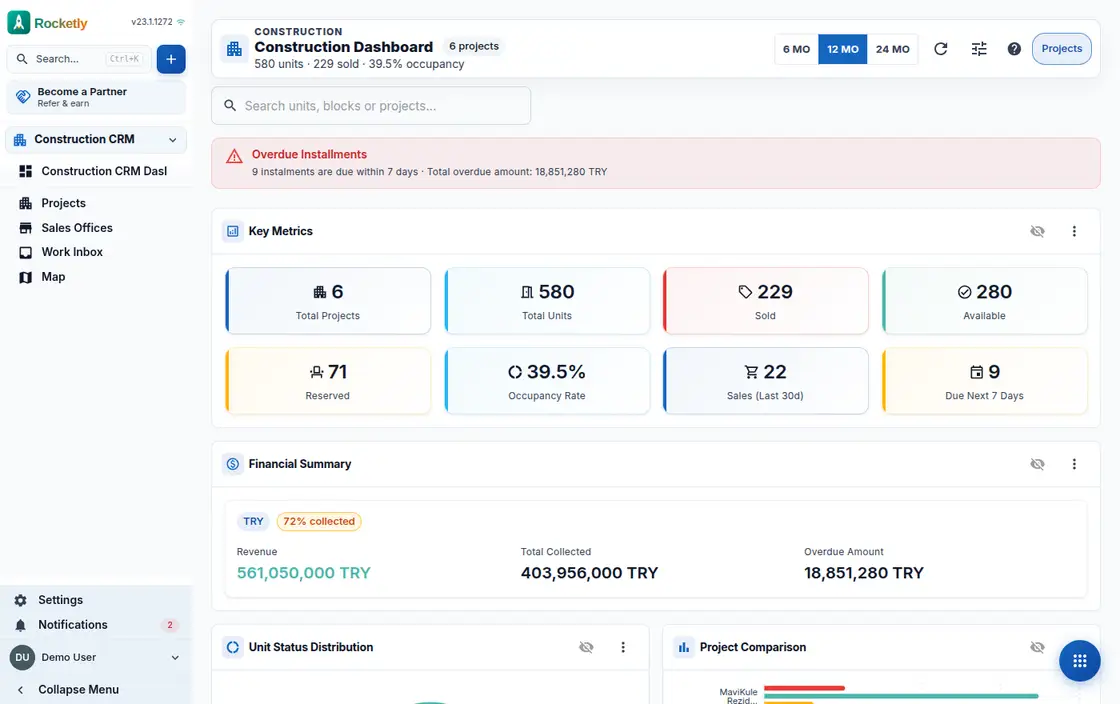
What you can do
Budget, commitment and actual
The bill of quantities budget, subcontract and order commitments, actual cost and remaining budget are read on one summary, so an overrun shows the moment it happens.
Subcontracts and progress payments
The retention rate is set in the subcontract; each progress payment period is calculated with its deductions and, once approved, creates a draft in accounting.
Daily site report
Every day is logged with labour and equipment counts plus schedule progress; the actual is recorded against plan for each work package.
Quality work center
Information requests, punch items and inspections collect in a single queue, and the work inbox lists open items from every project together.
Installments, receivables and collection
A payment plan is built for the sale, overdue installments are counted on the receivables screen, late fees are calculated and reminders go out in bulk.
Handover and material selections
Pre-handover inspections run from the delivery center, while the buyer picks materials on their own screen and any overage appears as an extra charge.
A REAL SCENARIO
A real working day
The flow that helps a team decide before a meeting
Progress payment in the last week
In the last week of the month the technical office lead opens the subcontractor's progress payment, and the contract's retention and advance deductions are calculated with the line items. Work package progress logged in that month's daily reports confirms the figure. Approval then creates the accounting draft.
Who is it for?
It suits property developers selling several projects, blocks and units at once who want installment plans, price revisions and site progress managed from one place.
SETUP PLAN
How to start
Define the project with its blocks, floors and individual units.
Set up your payment plan template with down payment, installment count and due day.
Separate sales offices and permissions, then try a price revision as a simulation first.
Content verified:
ANSWER CENTER
Frequently asked questions
Explore the questions teams ask before deciding, with short and direct answers.
Open a question to see the scope of the product and its practical boundaries.
What exactly does Construction CRM do?
Construction CRM keeps project, block and unit inventory in the same record chain as payment plans, progress payments, procurement and site reports. The sales showcase and the buyer portal run on that same data.
Who is Construction CRM for?
It suits property developers selling several projects, blocks and units at once who want installment plans, price revisions and site progress managed from one place.
What can I do with Construction CRM?
Budget, commitment and actual: The bill of quantities budget, subcontract and order commitments, actual cost and remaining budget are read on one summary, so an overrun shows the moment it happens. Subcontracts and progress payments: The retention rate is set in the subcontract; each progress payment period is calculated with its deductions and, once approved, creates a draft in accounting. Daily site report: Every day is logged with labour and equipment counts plus schedule progress; the actual is recorded against plan for each work package. Quality work center: Information requests, punch items and inspections collect in a single queue, and the work inbox lists open items from every project together. Installments, receivables and collection: A payment plan is built for the sale, overdue installments are counted on the receivables screen, late fees are calculated and reminders go out in bulk. Handover and material selections: Pre-handover inspections run from the delivery center, while the buyer picks materials on their own screen and any overage appears as an extra charge.
What does Construction CRM look like on a real working day?
Progress payment in the last week. In the last week of the month the technical office lead opens the subcontractor's progress payment, and the contract's retention and advance deductions are calculated with the line items. Work package progress logged in that month's daily reports confirms the figure. Approval then creates the accounting draft.
How should a team start with Construction CRM?
Define the project with its blocks, floors and individual units. Set up your payment plan template with down payment, installment count and due day. Separate sales offices and permissions, then try a price revision as a simulation first.
What does Construction CRM not replace?
Construction CRM is not a design or structural-calculation tool and does not replace the statutory accounting ledger; payment plans, progress payments and permission rules work only as far as you define them.
Which industry was Construction CRM verified for?
The verified industry scenario for Construction CRM is Construction. The industry page shows that end-to-end workflow. Other products used alongside it in the same scenario: Customer Portal, Quotes and Contracts.
Used together in the same industry
Start using Rocketly for free
Bring your team together in one CRM; no card needed to set it up.