What you can do
Sentiment distribution
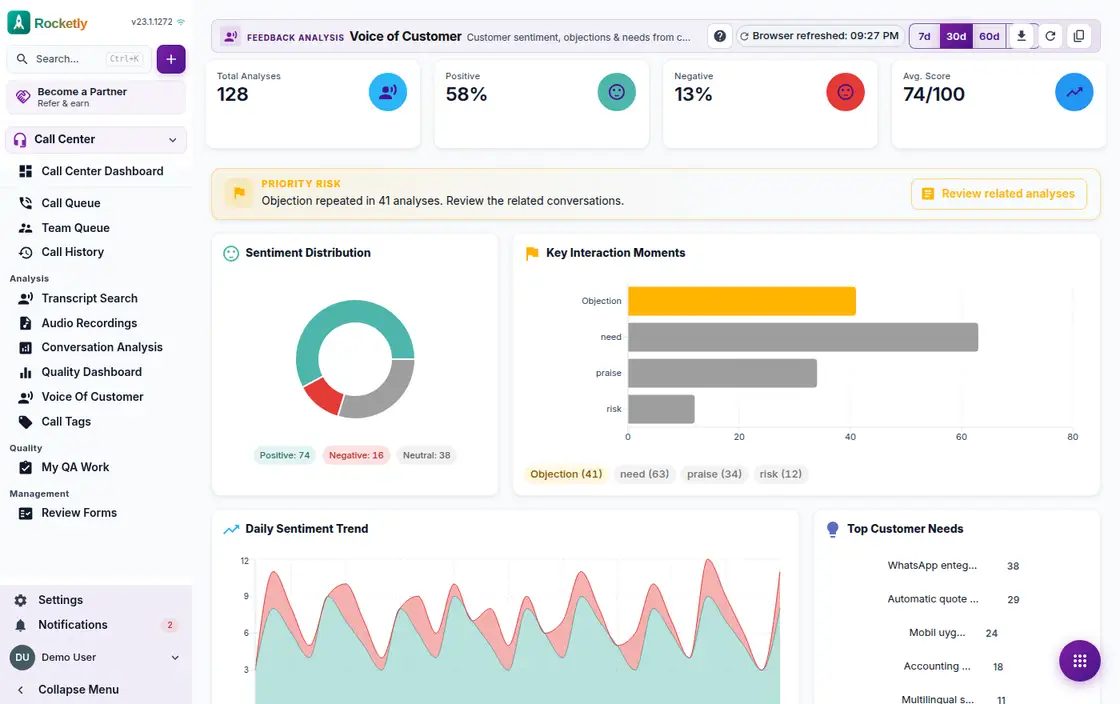
Every call analysis in the period is split into positive, neutral and negative. The average sentiment score condenses that picture into one figure.
Daily sentiment trend
Positive and negative counts are plotted day by day, with a note on whether the trend is improving or declining. A table view shows the same data.
Top customer needs
Needs that recur across calls are ranked by how often they appear. The focus need is shown together with the number of analyses it stood out in.
Key interaction moments
Key moments are grouped by type. The priority risk is pulled to the top of the list along with how many analyses it repeated in.
From signal to the call
See the priority customer signal and review the related analyses. You can also filter by sentiment and move on to the full analysis list.
Period choice and sharing
Choose how many recent days to show, then copy the link to that view and share it. The screen states when the data was last refreshed.
A REAL SCENARIO
A real working day
The flow that helps a team decide before a meeting
Monthly feedback to the product team
At the start of the month the product manager opens the Voice of Customer screen. Negative sentiment rose two weeks ago, and the same need recurs across dozens of analyses. He drills into the related analyses, listens to a few sample calls, then shares the link to that view with the product team.
Who is it for?
It suits businesses that want product and operations teams to evaluate customer-experience signals from analyzed calls together.
SETUP PLAN
How to start
Choose one customer-experience question you need to decide on.
Review feedback with its source and time period.
Validate examples with the responsible team before turning a theme into action.
Content verified:
ANSWER CENTER
Frequently asked questions
Explore the questions teams ask before deciding, with short and direct answers.
Open a question to see the scope of the product and its practical boundaries.
What exactly does Voice of Customer do?
Voice of Customer helps review feedback from different touchpoints under shared themes. Instead of over-reading one comment, the team can see recurring signals and unanswered questions.
Who is Voice of Customer for?
It suits businesses that want product and operations teams to evaluate customer-experience signals from analyzed calls together.
What can I do with Voice of Customer?
Sentiment distribution: Every call analysis in the period is split into positive, neutral and negative. The average sentiment score condenses that picture into one figure. Daily sentiment trend: Positive and negative counts are plotted day by day, with a note on whether the trend is improving or declining. A table view shows the same data. Top customer needs: Needs that recur across calls are ranked by how often they appear. The focus need is shown together with the number of analyses it stood out in. Key interaction moments: Key moments are grouped by type. The priority risk is pulled to the top of the list along with how many analyses it repeated in. From signal to the call: See the priority customer signal and review the related analyses. You can also filter by sentiment and move on to the full analysis list. Period choice and sharing: Choose how many recent days to show, then copy the link to that view and share it. The screen states when the data was last refreshed.
What does Voice of Customer look like on a real working day?
Monthly feedback to the product team. At the start of the month the product manager opens the Voice of Customer screen. Negative sentiment rose two weeks ago, and the same need recurs across dozens of analyses. He drills into the related analyses, listens to a few sample calls, then shares the link to that view with the product team.
How should a team start with Voice of Customer?
Choose one customer-experience question you need to decide on. Review feedback with its source and time period. Validate examples with the responsible team before turning a theme into action.
What does Voice of Customer not replace?
This view alone is not proof of customer satisfaction or causality. Sensitive data use must follow the applicable retention and access policy.
Which industry was Voice of Customer verified for?
The verified industry scenario for Voice of Customer is Hotel. The industry page shows that end-to-end workflow.
Start using Rocketly for free
Bring your team together in one CRM; no card needed to set it up.