What you can do
Softphone in the browser
Answer, hold, transfer and the DTMF keypad all live in the browser. You run the call next to the customer record, without opening a separate phone app.
Live calls and monitoring
Who is on a call and whose phone is ringing shows in real time. A supervisor can listen in, whisper so only the agent hears, or join the call outright.
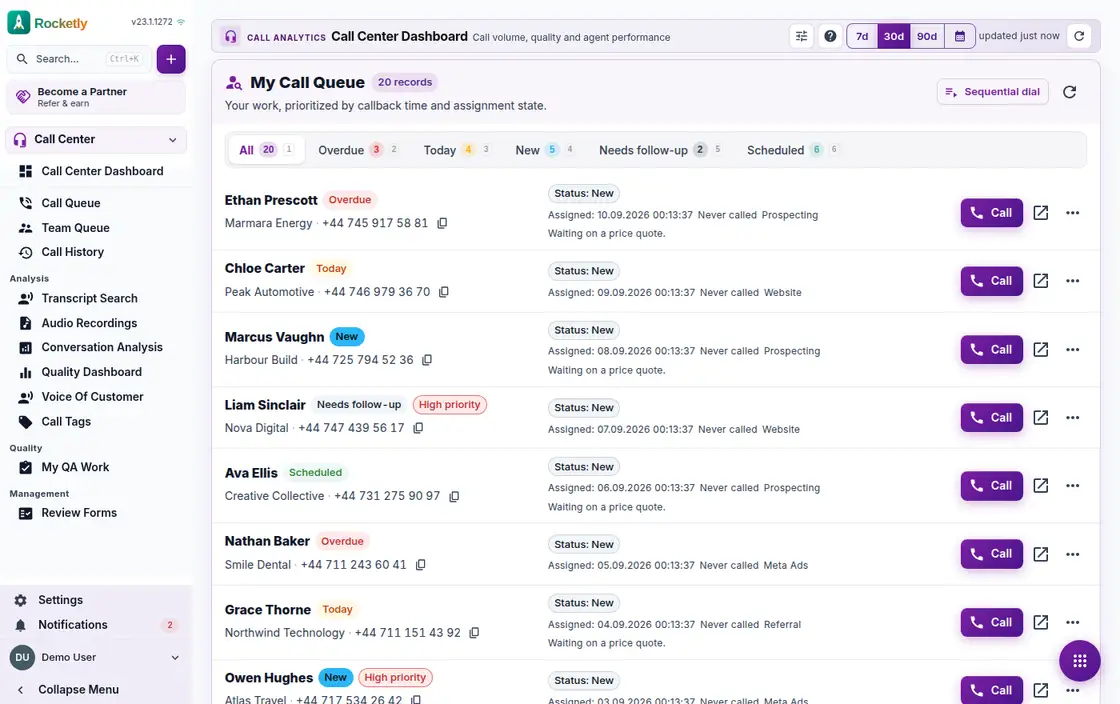
Call queue and sequential dial
Your own queue and the team queue stay separate. Sequential and power dial move the list along by themselves, and a record that is not ready waits until tomorrow.
Wrap-up and callbacks
As soon as the call ends you are asked for an outcome code and a note. From the same screen, one click schedules the callback for an hour later, tomorrow or a time you pick.
Recordings and transcript search
Play a recording from the call history and search for a phrase inside the transcript. Keep frequent filters as saved views, and export the list when needed.
SLA target and queue metrics
Set an answer threshold and a target service level. Average wait, abandonment rate, average answer time and the quality dashboard are watched from one place.
A REAL SCENARIO
A real working day
The flow that helps a team decide before a meeting
Calls during the lunch rush
At midday the queue grows and wait time creeps toward the SLA threshold. From the live calls screen the supervisor listens to a new agent and whispers guidance without the customer hearing. The moment the call ends, an outcome code and a callback reminder are saved, and anyone unreachable is one click away from a WhatsApp message via the button on their record.
Who is it for?
It suits teams answering calls with several representatives that want to track callback commitments and make routing rules transparent.
SETUP PLAN
How to start
Define queues around customer need and skill area.
Set a clear owner and due date for every callback.
Review volume and abandoned calls weekly through an exception list.
Content verified:
ANSWER CENTER
Frequently asked questions
Explore the questions teams ask before deciding, with short and direct answers.
Open a question to see the scope of the product and its practical boundaries.
What exactly does Call Center do?
Call Center helps organize queue, ownership, and follow-up work from call operations in a workflow connected to the customer record. The team sees workload not only as total call volume, but as pending work and responsibility.
Who is Call Center for?
It suits teams answering calls with several representatives that want to track callback commitments and make routing rules transparent.
What can I do with Call Center?
Softphone in the browser: Answer, hold, transfer and the DTMF keypad all live in the browser. You run the call next to the customer record, without opening a separate phone app. Live calls and monitoring: Who is on a call and whose phone is ringing shows in real time. A supervisor can listen in, whisper so only the agent hears, or join the call outright. Call queue and sequential dial: Your own queue and the team queue stay separate. Sequential and power dial move the list along by themselves, and a record that is not ready waits until tomorrow. Wrap-up and callbacks: As soon as the call ends you are asked for an outcome code and a note. From the same screen, one click schedules the callback for an hour later, tomorrow or a time you pick. Recordings and transcript search: Play a recording from the call history and search for a phrase inside the transcript. Keep frequent filters as saved views, and export the list when needed. SLA target and queue metrics: Set an answer threshold and a target service level. Average wait, abandonment rate, average answer time and the quality dashboard are watched from one place.
What does Call Center look like on a real working day?
Calls during the lunch rush. At midday the queue grows and wait time creeps toward the SLA threshold. From the live calls screen the supervisor listens to a new agent and whispers guidance without the customer hearing. The moment the call ends, an outcome code and a callback reminder are saved, and anyone unreachable is one click away from a WhatsApp message via the button on their record.
How should a team start with Call Center?
Define queues around customer need and skill area. Set a clear owner and due date for every callback. Review volume and abandoned calls weekly through an exception list.
What does Call Center not replace?
Call-center software does not provide carrier service, recording consent, or local communications compliance. Those responsibilities must be managed through the chosen infrastructure and company policy.
Which industry was Call Center verified for?
The verified industry scenario for Call Center is Insurance. The industry page shows that end-to-end workflow.
Start using Rocketly for free
Bring your team together in one CRM; no card needed to set it up.