What is a CRM and what does it do? A complete guide for small businesses
A complete, step-by-step guide to what a CRM is, the problems it solves, its core modules, and how to choose the right system.
When a business starts to grow, customer information quietly scatters: some lives in an inbox, some in a rep's phone contacts, and the rest in someone's head. While the company is small this seems harmless — but as sales volume climbs it turns into missed follow-ups, forgotten quotes, and the endlessly repeated question, "what did we last discuss with this customer?" Customer relationship management (CRM) exists precisely to solve this.
In this guide we walk through what a CRM is, the problems it solves, the modules it's made of, and how a small business should choose the right system.
What is a CRM?
CRM stands for Customer Relationship Management. In its simplest definition, a CRM is the system that brings all of a business's interactions with current and potential customers into one place. Who reached out, when, and through which channel; which quote was sent; what the next step should be — all of these find their answer on a single screen.
But seeing a CRM as merely a "contact book" badly undersells it. A well-configured CRM makes the invisible parts of the sales process visible and automates repetitive work.
What problems does a CRM solve?
The core problems a CRM solves in practice are:
- Scattered data: All customer information lives in one source; the "who has that info?" scramble ends.
- Missed follow-ups: Automatic reminders and tasks ensure no opportunity is forgotten.
- Unmeasurable performance: It becomes clear which channel, campaign and rep brings in the most.
- Slow responses: When incoming requests land in a single inbox, response times shrink.
A good CRM stops being your team's memory and becomes the engine of your growth.
The core modules of a CRM
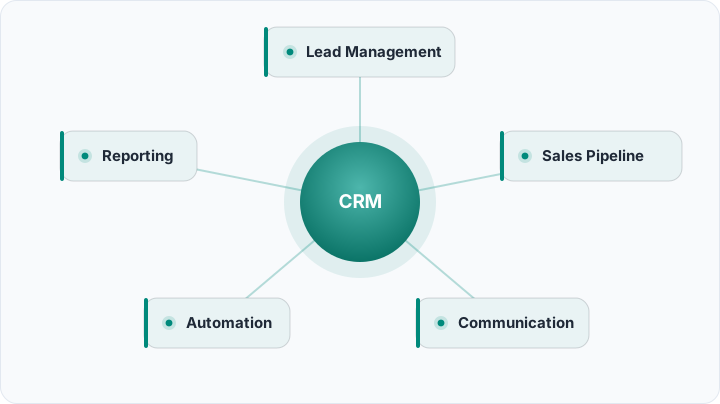
A modern CRM is made of a few core components. Each is a capability on its own; their real power comes from working together:
- Lead management: Captures and tracks every prospect from first contact. See our lead tracking guide.
- Lead scoring: Scores which prospect is "hot" so the team knows what to work first. We dig in deep in what is lead scoring.
- Sales pipeline: Visualizes which stage each opportunity is in. Read the sales pipeline guide.
- Multi-channel communication: Unifies WhatsApp, email and web forms into one inbox.
- Automation and reporting: Automates repetitive work with rules and makes results measurable.
Pros and cons of a CRM
No tool is a magic wand. An honest assessment looks like this:
Pros
- Customer knowledge becomes centralized; institutional memory survives even when the team changes.
- Follow-ups are automated and conversion rates become measurable.
- Managers make decisions based on real data.
Cons (and how to overcome them)
- Adoption curve: It takes time for a team to build new habits — a clean interface and a phased rollout make this easier.
- Requires data discipline: Information not entered into the system effectively doesn't exist — simple required fields and automation reduce this risk.
How to choose the right CRM
The right CRM should fit your business's size and industry. An overly complex system slows your team down, while one that's too simple won't meet your needs. As you choose, look for: multi-channel communication, automation, clear reporting, easy setup and local-language support. A native interface and local support noticeably speed up team adoption.
What is the difference between CRM and ERP?
The two terms are often confused. ERP (enterprise resource planning) runs the "back of house": inventory, production, accounting, procurement. A CRM runs the "front of house" — the relationship you build with the customer. Roughly, ERP looks inward and CRM looks outward. Most growing businesses use both; but for a team whose priority is growing sales, the first investment should almost always be a CRM, because revenue flows directly from the customer relationship.
Who needs a CRM?
"We're small, it's too early for a CRM" is one of the most expensive misconceptions. Any business that juggles several prospects at once, makes sales that require follow-up, or has more than one person touching the same customer will benefit from a CRM. A few telltale signs:
- The number of prospects has outgrown what a single salesperson can hold in their head,
- A sale requires follow-up over days or weeks,
- Leads from marketing vanish before they "land" in sales,
- A manager can't answer "why did we sell less this month?" with data.
If even one of these feels familiar, a CRM isn't a luxury — it's a need.
Common mistakes when adopting a CRM
A few common mistakes make the transition harder; knowing them upfront makes life easier:
- Trying to set everything up at once: Start with the core flow — lead and opportunity tracking — and add automations later.
- Leaving the team out: If the salespeople who use it daily aren't consulted, adoption drops.
- Not requiring data entry: Making a few key fields mandatory keeps your reports trustworthy.
- Not measuring results: If you don't track metrics like conversion rate and response time, you can't see your own improvement.
First steps
You don't need a complex plan to start. Import your existing customer list, invite your team, and set up your first automation. A well-configured CRM isn't just software; it's your sales team's most reliable colleague. Rocketly brings all of these modules into one panel so you can begin this journey in minutes.
Frequently asked questions
What's the difference between a CRM and Excel?
Excel is a static spreadsheet; it stores data but doesn't manage the relationship. A CRM manages customer history, follow-ups, reminders and automation together, so several people can work safely at once and no step is forgotten.
Does a small business need a CRM?
Yes. Any business that handles several prospects at once and makes sales requiring follow-up benefits from a CRM, even a one-person team. Adopting it early sets the right habits from the start.
Is a CRM hard to set up?
Modern CRMs are built for easy setup. You start by importing your existing customer list and inviting your team; advanced automations can be added later, as you need them.
Is my CRM data secure?
A good CRM protects your data with encryption, role-based access and permission controls. You can decide who sees what and restrict access to sensitive information.
Can I use a CRM on mobile?
Yes. Most modern CRMs offer mobile access; even in the field you can add leads, jot notes and check a customer's history.