CRM-payment integration: reflect every payment on the record
Does your CRM have no idea who has paid, and do failed payments slip away silently? CRM-payment integration brings payment status, paid triggers, failed-payment follow-ups and subscription status.
A deal closes and the customer pays. A subscription renews, or a card declines. A refund is issued, or an invoice finally clears. These payment moments are some of the most important events in any customer relationship; they are, quite literally, where the money is. Yet in many businesses the payment system and the CRM live in separate worlds. Payments happen in a gateway, a billing tool, or a processor's dashboard, while the CRM, where sales and support actually work, has no idea who has paid and who has not. The result is awkward and costly: reps chase customers who already paid, nobody follows up when a payment fails, and the customer record gives no hint of the financial reality. Connecting your payment system to your CRM fixes this. Every payment event updates the customer record automatically, so the CRM finally reflects not just what people said, but what they actually paid. This guide explains how it works, what it does, and how to do it safely.
What CRM-payment integration means
A CRM-payment integration links the system that handles money, such as a payment gateway, a card processor, or a recurring-billing tool, to your CRM, so that financial events flow onto the customer record. When a payment succeeds, fails, renews or is refunded, the CRM is updated to reflect it. The defining idea is that the CRM stops being blind to money: instead of being a place that only tracks conversations and deals in the abstract, it becomes a record that knows whether each customer has actually paid, what they owe, and where their payments stand. This closes the gap between the sales-and-service view of a customer and the financial view of the same customer.
It is worth distinguishing this from accounting integration. Connecting your accounting software is about invoices, bookkeeping and reconciliation, the formal financial records. Payment integration is about the moment of payment itself and its immediate effect on the customer relationship: did this person pay, should we start their onboarding, do we need to chase a failed charge. The two are related and often work together, but payment integration is specifically about making payment events drive what happens next in the CRM.
The cost of a disconnected payment system
When payments and the CRM are separate, familiar problems appear. Manual status checks: to know whether a customer has paid, someone has to open the payment tool and look, then update the CRM by hand, which is slow and quickly out of date. Chasing paid customers: a rep, seeing no payment recorded in the CRM, follows up with someone who paid days ago, which looks careless and erodes trust. Missed failed payments: when a charge fails or a subscription lapses, nobody in the CRM is prompted to act, so revenue quietly leaks away. And no financial context on the record: the person managing the relationship cannot see whether this is a paying customer in good standing or one with an overdue balance, so they treat everyone the same.

Each of these comes from the same root: the CRM does not know about money. That blindness wastes effort, embarrasses your team, and lets revenue slip through the cracks. Connecting payments turns each financial event into an update on the record the moment it happens, so the CRM reflects reality and the right action follows automatically.
What the integration actually does
A CRM-payment integration brings together several capabilities, each closing a specific gap:
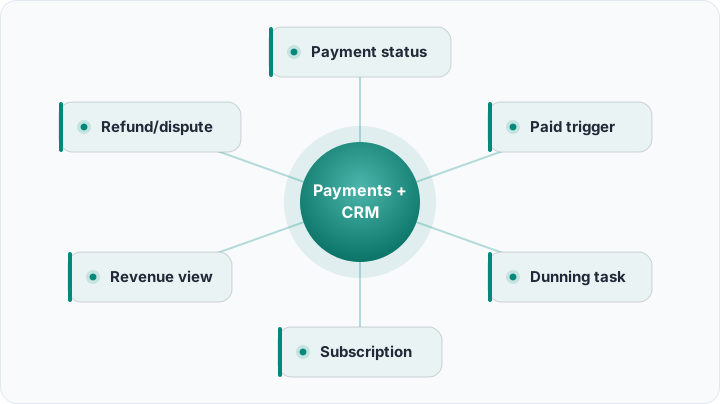
- Payment status on the record: Whether a customer has paid, is pending, failed or was refunded shows directly on their record.
- Paid triggers: A successful payment can automatically move a deal forward and kick off the next step, like onboarding or fulfilment.
- Failed-payment tasks: A declined charge or lapsed payment creates a follow-up task, so nobody has to notice it manually.
- Subscription status: For recurring billing, the record shows whether the subscription is active, past due or cancelled.
- Revenue view: The value a customer has actually paid is visible on the record, not just the deal you hoped to close.
Together these make the CRM aware of money, so payment events drive action instead of sitting unseen in a separate tool.
Payment status and what it unlocks
The most basic benefit is simply seeing payment status on the record. When anyone opens a customer in the CRM, they can tell at a glance whether that customer has paid, is awaiting payment, or has a problem, without leaving to check a separate system. This single piece of context changes behaviour: support treats a paying customer differently from one whose payment failed, and sales knows when a deal is truly done. Better still, a successful payment can trigger the next step automatically: the deal moves to won, onboarding begins, the product is provisioned, a thank-you is sent. This is sales automation applied to the moment of payment, turning a financial event directly into the right follow-on action with no manual handoff.
Failed payments never slip away silently
One of the most valuable functions is handling failed payments. A declined card, an expired payment method, or a lapsed subscription is lost revenue waiting to happen, but only if someone acts. Without integration, a failed charge is invisible to the people working in the CRM, so it often goes unaddressed until the customer is gone. With it, a failed payment automatically creates a task to follow up, attached to the customer's record, so someone reaches out, updates the payment method, or recovers the subscription. Turning silent payment failures into visible, owned follow-ups is one of the most direct ways an integration protects revenue you have already earned.
Recurring billing and subscription status
For any business with subscriptions or recurring payments, integration is especially powerful. The record can show whether a customer's subscription is active, past due, or cancelled, so sales and support always know the customer's true standing. A renewal can confirm a healthy account; a cancellation or a string of failed charges can flag a churn risk and prompt a save attempt. Without this, the team works from a sales-era snapshot of the customer that may be months out of date, unaware that the customer has quietly stopped paying. With it, the CRM stays current with the customer's financial relationship as it evolves over time.
A concrete example
Consider a business selling a recurring service. Before integrating payments, when a customer signed up, a rep manually marked the deal won and emailed operations to start onboarding; if a monthly charge later failed, no one knew unless they happened to check the billing tool, and a few customers churned simply because a failed card was never followed up. After connecting the payment system to the CRM, a successful first payment instantly moves the deal to won and triggers the onboarding sequence, with no manual step. Each month, successful renewals quietly confirm healthy accounts, while any failed charge automatically creates a task for the account owner to reach out and fix the payment method. Over a quarter, the business recovers several subscriptions that previously would have silently lapsed, and the team never again chases a customer who has already paid. The same payment activity now drives the right action automatically, and the customer record always reflects the financial truth.
Pitfalls to keep in mind
Never store card data in the CRM
Payment integration should sync status and amounts, not raw card numbers. Handling card data carries strict security obligations; let the payment processor hold the sensitive details and keep only safe references in the CRM.
Match payments to the right record
A payment must attach to the correct customer. Decide how payments are matched, usually by email or a customer ID, so money lands on the right record rather than creating orphaned or duplicate entries.
Handle refunds and disputes
Payments are not always final. Make sure refunds, chargebacks and disputes also flow to the record, so the CRM reflects the true net position rather than only the original payment.
How Rocketly handles payment integration
Rocketly is designed so payment events become part of the customer record rather than living in a separate silo. A successful payment can move a deal forward and trigger the next step, payment and subscription status can show on the record, and a failed payment can raise a follow-up task automatically, all on the same timeline as emails, calls and notes, so the person managing the relationship sees the financial picture alongside everything else. Because this runs on the same workflow and integration layer as the rest of the platform, it connects through the same API, webhooks and Zapier approach as your other tools, and works hand in hand with your accounting integration so payments and bookkeeping stay aligned. To understand why one complete customer record, money included, is the foundation everything builds on, see our guide to what a CRM is.
Conclusion
Connecting your payment system to your CRM ends the strange situation where the system your team works in has no idea who has paid. Payment status appears on the record, successful payments trigger the next step automatically, failed payments turn into follow-ups instead of silent losses, and subscription standing stays current, so the CRM reflects financial reality and the right action always follows. The principle is the same as every good integration: capture the event where it happens, update the record automatically, and let it drive what comes next. Start by syncing payment status and automating what a successful payment triggers, add failed-payment follow-ups, and your CRM will finally know not just what customers promised, but what they paid.
Reflect every payment on the customer record automatically
Rocketly connects your payment system to the CRM: payment status shows on the record, a successful payment fires the next step, and failed payments create follow-up tasks. No credit card required.
Start Free