Measuring AI Traffic: Seeing ChatGPT and Perplexity Visits in GA4
Visitors from AI search are hiding in your analytics. Learn to find AI traffic in GA4, split it into its own channel, and read the real limits of a click.
There is a new source of traffic hiding in your analytics, and you are almost certainly not counting it yet. When someone asks ChatGPT a question, sees your brand named inside the answer, and clicks through, that visit lands in Google Analytics like any other. In most businesses, though, it quietly disappears into an anonymous Referral bucket — recorded, but never identified for what it truly is: a visitor sent to you by an AI search engine that had already done half of the selling.
If you have been wondering whether AI search sends you real, clickable visitors rather than only mentions, the answer is already sitting in your own data; it simply has to be made visible. This article walks through how to surface AI traffic in Google Analytics step by step, how to split it into a channel of its own, why most small businesses overlook it entirely, and — most importantly — why a single click describes only a sliver of your real visibility in the answers people are actually reading.
Do AI engines really send traffic? Yes
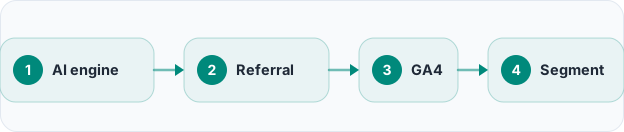
The short answer is yes, and it is growing. Generative engines increasingly show their working: Perplexity lists its sources openly beneath every answer, ChatGPT attaches citations when its web search is active, and Gemini and Copilot both link out to the pages they drew from. Each citation and suggested link is a door back to your site; when a reader walks through it, they arrive as an ordinary referral visit. In practice these visits come from domains such as chatgpt.com (formerly chat.openai.com), perplexity.ai, gemini.google.com and copilot.microsoft.com. The volume may look modest at first, but it behaves differently from the rest of your traffic and compounds as more buyers move their questions to AI.
Finding AI referrals in Google Analytics, step by step
The good news is that you do not need to buy another tool to see any of this; your analytics is already collecting it. Bringing it to the surface takes only a handful of deliberate steps:
- Open the Traffic acquisition report. Go to Reports, then Acquisition, then Traffic acquisition, and switch the primary dimension to Session source / medium, where every referrer is listed by name.
- Search for the engine domains. In the table's search box, type chatgpt, then repeat for perplexity, gemini and copilot. For each of these the medium will almost always read referral, confirming these are genuine click-throughs.
- Build a free-form Exploration. In the Explore section, add Session source as a row, bring in Sessions, engaged sessions and conversions as values, and apply a filter where the source matches a regular expression that lists your AI domains. Now you have a reusable report, not a one-off search.
- Create a lasting custom channel group. In Admin, define a custom channel group and add a channel named something like AI / Generative engines, with the condition that the source matches a regex including chatgpt, perplexity, gemini and copilot. From that point on, this traffic gathers automatically in a channel of its own instead of hiding inside Referral.
- Save the view and watch the trend. Keep it as a segment or a comparison so you can follow it week over week and month over month, because with this source the direction of travel matters far more than any single day's figure.
One detail separates catching this traffic from missing half of it: use a regular expression rather than a plain-text match, so a single rule captures subdomains and variants such as www.perplexity.ai or the older chat.openai.com. You are not chasing a precise number — you are confirming the source exists and watching where it moves over time.
Why most small businesses miss it
Several things conspire to keep this traffic invisible. First, your analytics has no built-in AI channel, so these sessions fall by default into Referral — and, as we will see, sometimes into Direct — blended in with newsletters, partner links and everything else. Second, because the volume starts small next to Google Search, it is easy to skim past in a report sorted by size. Third, some AI products, mobile apps in particular, do not pass a referrer at all; when that happens the visit is logged as Direct / (none) and its true origin vanishes. And the plainest reason of all: nobody told them to look. The channel is new, and you tend not to find a source you are not searching for.
What this traffic actually tells you
Set up properly, AI traffic is more than a curiosity — it is a signal you can act on. It proves generative engines are not only naming you but linking to you, and that real people follow those links — confirmation your content is being surfaced, not merely theorised about. Looking at which pages these visitors land on tells you exactly which of your pages the engines find quotable — a concrete brief for what to write more of. Tracked patiently over weeks, this source also becomes a directional read on whether your generative-search work is gaining ground. Whoever starts watching earliest sees the trend earliest, so there is nothing to gain by waiting to start measuring your AI visibility today.
The limit: a click is only part of the picture
Here honesty matters, because this is where reporting quietly distorts the truth. The defining limitation of AI traffic is that most questions put to a generative engine are answered inside the chat. Many see you named as a source, read what the engine says, and never click at all. Referral clicks therefore understate your real visibility rather than measure it: a click means you were both cited and compelling enough to be worth a visit, but a citation read and trusted without a click has still done its work. Add the apps that pass no referrer and the sessions that blur into direct traffic, and the AI numbers in your analytics look less like a ceiling than a floor — a lower bound sitting beneath your true presence in AI answers.
That is precisely why you cannot stop at click data. To see the answers that name and cite you without ever sending a click, you have to measure the answer itself — to track brand mentions in AI answers and to follow the KPIs that actually matter on a GEO dashboard, such as share of voice and citation rate. Your analytics can describe the click side precisely; it says nothing about the far larger set of answers in which you appeared and were quietly believed, but nobody clicked.
Where traffic sits within the whole of GEO
Put the pieces together and AI referral traffic is one honest, useful instrument on a much larger dashboard: the downstream, click-based view of your visibility. The substance of what generative engine optimization (GEO) is lives further upstream, in being named and cited inside the answer in the first place. The click is merely the last, most visible link of that chain — a step many satisfied readers never take.
It is also worth thinking about what these visitors do once they arrive, because they behave unlike anyone else. Someone who has already worked through the basics with an AI reaches your site with sharper questions and less patience than a classic search visitor, which is why AI-search visitors convert differently and deserve a path designed for them. This is where Rocketly's GEO Suite complements your analytics: it measures the answer side of the picture — whether engines name you, whether they cite you or a competitor, your share of voice and your citation rate — weekly for Google AI Overviews as standard, with ChatGPT and Perplexity measurement in a controlled rollout. Your analytics shows the clicks; the GEO Suite shows the answers behind them; together they give the whole picture, not half of it.
Frequently asked questions
Do ChatGPT and Perplexity visits really show up in Google Analytics?
Yes. When a reader clicks a link or a cited source inside an answer, the visit arrives as a referral from a domain such as chatgpt.com or perplexity.ai, and you can see it by name in your reports. The caveat is that some AI apps, especially on mobile, do not pass a referrer, so a share of genuine AI visits can land in Direct instead. That is why it helps to read your referral report alongside any unexplained movement in your direct traffic.
Why does my AI traffic look smaller than I expected?
Because a click is only one slice of AI visibility, and usually the smaller one. Most people take the answer straight from the chat and leave without visiting anyone, so low click volume does not mean you are uncited — often the opposite. To see the real picture you need answer-level measurement beside the clicks: how often you are named, in what context, and whether you are cited as a source in the answers themselves.
What is the best way to track AI traffic over the long term?
Define your AI domains once with a regular expression, capture them in a custom channel group or a saved Exploration, and then review the trend on a regular cadence rather than staring at daily noise. Pair that click-side view with a GEO dashboard that measures the answer side, and you will be watching both the visit and the visibility behind it at the same time — which is the only honest way to judge whether your GEO work is genuinely paying off.