What is a sales CRM? How it differs from a general CRM and its core functions
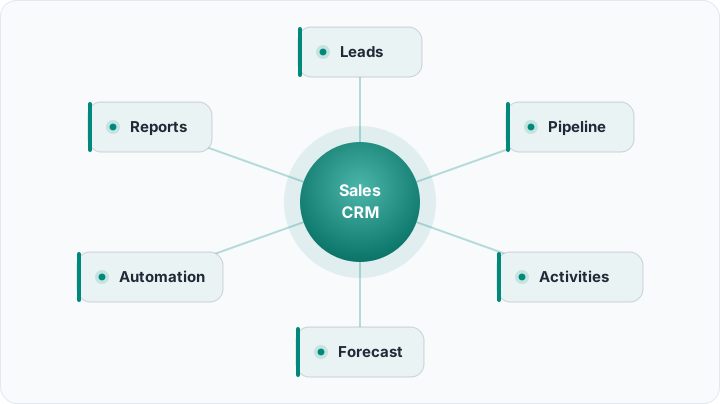
What a sales CRM is: how it differs from a general (all-in-one) CRM, its core functions (lead/opportunity management, pipeline, activity tracking, forecasting, automation, reporting), benefits, who needs it, and how to choose and set one up.
"CRM" is a broad concept — it spans many areas, from marketing to customer service. A sales CRM is a specialised form of that concept: it focuses specifically on the sales process, that is, turning leads into opportunities and opportunities into closed deals. If a business's main concern is "closing more sales, faster," this is exactly what it needs.
A sales CRM is designed to make the sales team's daily work easier: it shows where each opportunity is, reminds you of follow-ups, automates repetitive work and gives the manager a dashboard showing the health of sales. In this guide we cover what a sales CRM is, how it differs from a general CRM, what it does, who needs it and how to choose one. For the basic concept, the what is a CRM article is a good start.
What is a sales CRM?
A sales CRM is a customer relationship management system designed specifically for the sales process, used to manage a business's sales activities. It captures leads, qualifies them, advances them through a pipeline and tracks them until close. Its core aim is to help the sales team close more deals by missing no opportunity and taking the right step at the right time. In short, a sales CRM is the operating system of selling.
The difference between a sales CRM and a general CRM
The difference is in focus. A general (all-in-one) CRM covers sales, marketing and customer service together; it manages a broad customer journey. A sales CRM focuses deeply on the sales part of that journey: it's strong in features like pipeline management, opportunity tracking, sales forecasting and rep performance. In fact, many modern CRMs offer both a broad scope and a powerful sales module; the term "sales CRM" describes how prominent a tool's sales capabilities are. We covered the different faces of a CRM in types of CRM.
What does a sales CRM do? Core functions
A good sales CRM brings these core functions together:
- Lead and opportunity management: captures all incoming leads, qualifies them and turns them into opportunities.
- Pipeline: visually shows which stage each deal is in.
- Activity tracking: ties calls, emails, meetings and notes to each opportunity.
- Tasks and reminders: reminds you which opportunity to follow up and when, so none is forgotten.
- Sales forecasting: predicts future revenue based on the current pipeline.
- Automation: automates repetitive work like assignment, follow-up and data entry.
- Reporting: offers dashboards for conversion rates, stuck stages and team performance.
All these functions reduce the sales team's admin load so more time goes to the real work — selling.
The benefits of a sales CRM
A sales CRM brings concrete results. No lead getting lost means more opportunities; timely follow-up means higher conversion; a visible pipeline means more accurate forecasting and management. The team knows who to reach and when; the manager sees where selling gets stuck. Most importantly, selling no longer rests on individual people's memory but on a system everyone sees — even if a rep leaves, the knowledge stays.
Who needs a sales CRM?
Almost every business that sells benefits from a sales CRM, but some signals make the need urgent: several people are reaching the same customers and clashing; opportunities are tracked in an Excel file or in people's heads; follow-ups are forgotten and leads cool off; the manager can't give a clear answer to "how much will close this month?" If any of these is true, a sales CRM pays for itself quickly.
What to look for when choosing a sales CRM?
The right sales CRM isn't the one with the most features but the one simple enough for your team to actually use and suited to your need. Ease of use, the ability to adapt the pipeline to your own process, automation power, mobile access and integration with the other tools you use are important criteria. You can find which features are critical for you in CRM features, and the steps of choosing in the CRM selection guide. A CRM the team doesn't adopt is useless, even the most expensive one.
A sales CRM and lead management
A sales CRM and lead management are intertwined: the sales CRM is the tool that runs lead management's seven steps (capture, qualify, score, assign, respond fast, nurture, convert). Leads enter the sales CRM, advance in the pipeline and turn into customers. We detailed this whole process in lead management. A good sales CRM turns lead management from a theory into a practice that works every day.
How do you set up a sales CRM?
To start, first define your own sales process: when a lead arrives, what stages does it pass through? Set up these stages in the pipeline, then automate the repetitive steps (assignment, follow-up reminders). Then train the team and make data entry a habit — because an empty CRM is useless. CRM workflow automation shows the ways to set up automation, and the sales pipeline article helps you understand the pipeline. Start small, expand as the process settles.
Sales forecasting: seeing the future
One of the most valuable but underused capabilities of a sales CRM is forecasting. By looking at the stage, value and probability of close of the opportunities in the pipeline, it predicts how much revenue you can expect next month or quarter. This lets you plan with data instead of "hopefully it goes well": you allocate resources correctly, set realistic targets and see deviations early. A good forecast isn't intuition but the maths of the pipeline — and that maths only works correctly when your data is up to date.
How do you get the team to adopt a sales CRM?
Even the best sales CRM is useless if the team doesn't use it — and getting sales teams used to a tool is often the hardest part. The secret to adoption is positioning the CRM not as a "manager surveillance tool" but as a helper that makes the rep's job easier. Keep the tool simple, remove unnecessary fields, automate data entry and show the team the concrete benefit (fewer forgotten follow-ups, more closed deals). Managers should set the example and read reports from the CRM. When the team sees the tool adds value for them, no forcing is needed.
A sales CRM and the other CRM types
A sales CRM is a member of the CRM family; it works together with the analytical and collaborative types. The operational side runs selling, the analytical side learns from selling, the collaborative side carries information to all teams. Many businesses start with sales and over time add the capabilities of the other types too. So in the real world a sales CRM often works not alone but as part of a broader system. We showed different use scenarios in CRM examples.
Common mistakes
Avoid these mistakes: setting up a sales CRM but never making data entry a habit (the most common and most fatal mistake); forcing the pipeline to a ready-made template instead of your own process; imposing the tool without giving the team enough training; and never opening the reports and not learning from the system. Another trap is choosing an overly complex tool and overwhelming the team. The best sales CRM is the one the team willingly uses every day.
Example: a sales team's day
Picture a three-person sales team. In the morning each rep opens the sales CRM and sees the opportunities to follow up today — the system has reminded them. A new lead is automatically assigned to a suitable rep, who replies within five minutes. Throughout the day, calls and emails are automatically logged to the relevant opportunity. In the evening the manager looks at the pipeline: how many deals are about to close this month, where there's a stuck stage. Nothing is left to people's memory; the team sells more with less admin work.
Build your sales process with a sales CRM
A sales CRM lets your team see, follow up and close every opportunity. Rocketly manages your pipeline, automates follow-ups and connects channels like WhatsApp directly into the process; no deal falls through the cracks. Try it on the free plan, no credit card required.
Start FreeSummary
A sales CRM is a CRM that focuses specifically on the sales process — turning leads into opportunities and opportunities into closed deals. Its difference from a general CRM is that the depth is on the sales side: it's strong in the pipeline, opportunity tracking, forecasting and automation. Almost every team that sells benefits from one; the secret to choosing the right one is finding the tool the team will actually use, not the one with the most features. When you set it up, selling moves out of people's memory into a system everyone sees and that keeps improving.