The CRM data model: contacts, companies, deals and how they connect
Most CRM problems come from a broken data model, not bad software. Here is what contacts, companies and deals really are — and how to connect them, from scratch.
Why does a CRM so often turn into a swamp after six months? Usually not because the software is bad, but because the CRM data model underneath it was set up wrong on day one. The same customer sits in the system three times, an open deal is attached to the wrong person, and nobody can tell which company the caller on line two belongs to. It all traces back to one root cause: never getting clear on what a contact, a company and a deal are, and how they connect.
This guide builds that object model from scratch: the core record types, how they connect, where B2B and B2C differ, and how to set it up right from the start.
Why the data model decides a CRM's fate
In a spreadsheet, everything lives in one table: one row per customer, one column per fact. It works — until you handle two people at one customer, or three separate sales with one company. That is when a flat list stops coping: real relationships are not flat.
This is where a CRM differs. It splits your data into connected objects: people, organizations and sales, kept separate but linked. The payoff is concrete — in a well-built model, "what have we done with this company before?" is a one-click answer. New to the category? Our guide on what a CRM is and does is a good starting point.
When the model is wrong, the opposite happens: reports don't reconcile, automations fire at the wrong contact, and the team stops trusting the data. It is one of the most common but least-discussed reasons CRM projects fail — the software is fine; the data structure is broken.
A CRM is only ever as good as the data model beneath it — not one inch better.
The three core objects: contact, company, deal
Almost every CRM starts with the same three record types. The labels change from tool to tool, but the logic is the same.
- Contact (person): A single human being with a name, phone, email and job title — like "Sarah Blake, purchasing manager." You communicate with a person, never with a company.
- Company (account): An organization, such as "Blake Construction Ltd." Its tax number, address and industry live here, and it can have many contacts underneath it.
- Deal (opportunity): A specific chance to sell — "flooring quote for Blake Construction." It carries an amount, a stage, a close date and a probability, and moves forward over time.
The critical point: these must not be blurred. A contact answers who, a company answers where they work, and a deal answers what we're selling. Picture a handmade-candle workshop: the hotel that places a wholesale order, the buyer at that hotel, and "the first order of 50 boxes" are three separate records — not one.
The real magic is in the relationships
Defining objects one by one isn't enough; the value hides in the links between them.
A single company can hold many contacts — a buyer, an accountant, the owner. You can run many deals with it: this year's project, next year's service contract. Every deal ties to the company and usually one or more contacts, and every call, email and quote clips on as an activity.
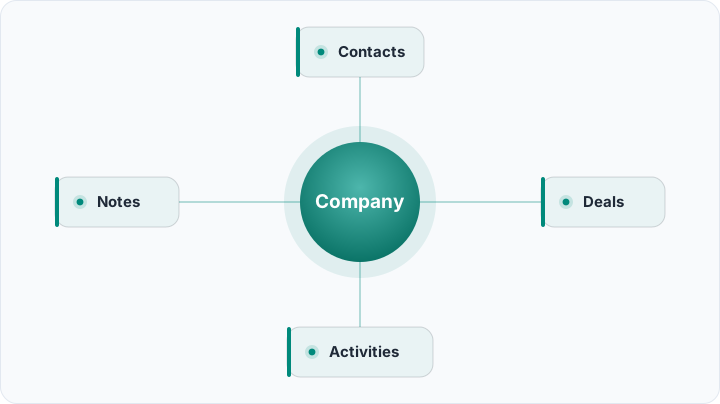
Because of this, opening one company card shows who you've spoken to, which sales are open, and what was last said — all in one place. That is where a 360-degree customer view technically comes from: not magic, just properly connected records.
B2B or B2C? You don't always need the company layer
Be honest: not every business needs a "company" object. Match the model to how you actually sell.
B2B: the company layer is essential
If you sell to other businesses, the company layer is non-negotiable. Your counterpart is the organization; people come and go, but the relationship with the firm stays. When a buyer resigns, you don't want three years of history walking out with them.
B2C: often the person is enough
For a hair salon, a dental clinic or an online boutique selling straight to consumers, "company" is usually a layer you don't need — the customer is already an individual. A company object there just adds friction; a contact with its own deals and appointments is plenty.
There are in-between cases — someone selling to freelancers or sole traders might use both. The rule of thumb: if there's an organization behind the person that you deal with in its own right, you need the company layer.
The most common modeling mistakes
The same mistakes keep showing up, most preventable by a five-minute decision at setup.
- Blurring contact and company: Entering "Blake Construction" as if it were a person. Then the second contact at that firm has nowhere to go.
- Attaching the deal to the wrong record: Tying a sale only to a person. When they leave, the sales history detaches from the company. A deal should always link to the company where one exists.
- Writing deal data into contact fields: Typing "quoted 15k" into a notes box. That belongs in a deal record, so it can be reported and tracked by stage.
- Duplicate records: The same company entered three times with three spellings. Without a de-duplication habit, the model rots within months.
- Keeping everything in one "customer" table: That is just turning the CRM into an expensive spreadsheet. The real difference between Excel and a CRM is exactly this relational structure; ignore it and the switch was pointless.
Get the data model right from day one
Rocketly ships the contact–company–deal structure ready-made for small teams, so you just add your business.
Try Rocketly freeThe supporting objects that complete the model
Around the three core objects sit helper records that complete the model. Without them, a CRM is a static address book.
- Activities: Calls, emails, WhatsApp messages, meetings. Each links to its contact, company and deal, so "when did we last talk?" always has an answer.
- Notes and tasks: Free-form notes plus reminders like "call Tuesday." Tie a task to a person and a record, and nothing falls through the cracks.
- Products and line items: What you're actually selling, added inside the deal — showing where the amount comes from and feeding quotes and invoices.
One sensitive thread runs through all of this: personal data. Phone numbers, addresses and message history live inside these records, so a data-protection-compliant CRM starts when you design the model, not as a feature bolted on later.
One record, many hats: identity and duplicates
The sneakiest reason a model falls apart is identity. One customer might message from a personal number, order under a company name, and pay from a different email — to software, three strangers.
A concrete example: a furniture maker may have saved the same firm three times — under two spellings and once as just a phone number. The quote sits in one record, the complaint in another, the payment in a third. So set a clear rule early: the same tax number (or phone) is the same company, and everything gathers under that identifier, not the spelling of a name.
Then there's the "same customer is also my supplier" case. The fix is not a second record but a role or tag on the single one, so relationships stay attached to one accurate entry instead of splitting in two.
Setting the model up right from the start
The good news: you don't need to be a database expert. The sequence is simple, and each step pays off on its own.

First decide which objects you genuinely need: for most small businesses, contact and deal — plus company for B2B. Then wire the relationships, so contacts and deals point to companies. After that, move your data in while cleaning it — exactly where you weed out duplicates.
That's why, when you migrate data into a new system, nailing the target model first is essential; otherwise you just carry the old mess into the new tool. Get the model right, and every report and automation on top of it stands on solid ground.
Frequently asked questions
What is the difference between a contact and a company?
A contact is one person you communicate with; a company is the organization they belong to, and one company can hold many contacts. In B2B you usually need both; in B2C the contact alone is often enough.
Do I need the company object in my small business?
Only if there's an organization behind the person that you deal with in its own right. Sell to other businesses and the company layer is essential; sell to consumers and it's often unnecessary.
Should a deal link to the person or the company?
To the company where one exists, and usually the relevant contact too. That way, if the individual leaves, the sales history stays with the organization instead of disappearing with them.
What if the same customer is also my supplier?
Mark its role with a tag or field rather than creating a duplicate. The relationships — contacts, deals, activities — stay attached to that single, accurate record.
The data model is the invisible skeleton of a CRM. Separate contact, company and deal correctly, connect them the right way, and everything on top — reports, automations, team habits — falls into place almost on its own. Tools built for smaller teams, like Rocketly, ship this structure ready to use; but whatever you pick, a few minutes on the model up front saves hours of cleanup later.