What is a 360-degree customer view? One profile, every touchpoint
A 360-degree customer view puts every touchpoint — chats, orders, invoices, support — into one profile. What belongs in it and how to build one, honestly.
A customer messages you on WhatsApp asking about the quote you sent last week. The rep who answers has no idea that this same person called support twice, or that accounting has an unpaid invoice sitting on their account. So the rep is cheerful, helpful, and completely blind. That gap — between what your company collectively knows and what any one person can see — is exactly what a 360-degree customer view is meant to close.
This article explains what a 360-degree customer view really is, what belongs in it, how to build one without drowning in a data project, and, honestly, when it isn't worth the effort.
What a 360-degree customer view actually means
Strip away the jargon and it is simple: one screen where you can see everything your business knows about a single customer. Every message across every channel, every quote and order, every invoice and payment, every support ticket, and the basic facts — who they are, what they have bought, what they have asked for.
The "360 degrees" part means no blind spots. Not just the sales side. Not just the support tickets. The whole circle. When a rep opens a contact, they see the same history a support agent sees, and the same balance accounting sees.
It is worth saying what it is not. It is not surveillance, and it is not about hoarding every possible data point because you can. A good 360 view is the relevant history in one place, not a dragnet.
Why scattered data quietly costs you
Most small businesses do not decide to silo their data. It happens on its own. Sales lives in one spreadsheet or CRM, support answers from a shared inbox, invoices sit in the accounting software, and half the real conversation is in someone's personal WhatsApp.
Picture a small kitchen-renovation firm. A customer signed a contract in March, complained about a delayed countertop in May, and is now asking for a second quote for a bathroom. The salesperson who picks up the phone sees none of that. They pitch enthusiastically, the customer feels unheard, and the deal cools.
The cost is rarely a single dramatic failure. It is a slow tax: repeated questions, missed follow-ups, discounts handed to angry customers whose problem was the company's fault, and decisions made on half the picture. If your customer records currently live in spreadsheets scattered across a few laptops, you already pay this tax.
What belongs in the profile (and what does not)
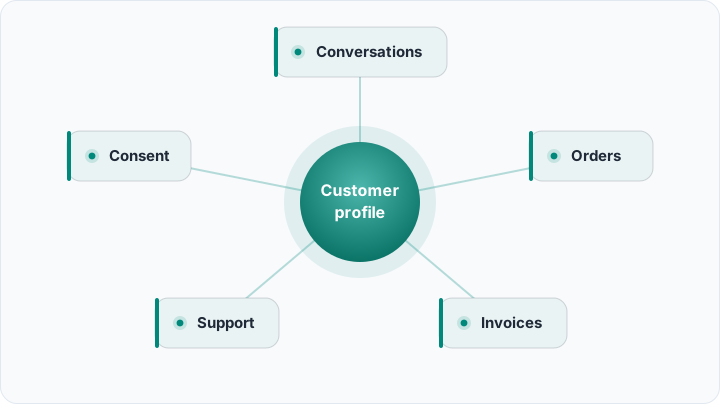
A useful profile is built from a handful of layers. You do not need all of them on day one, but this is the full circle:
- Identity: the stable facts — name, company, phone numbers, email addresses, and a single ID that ties everything together.
- Conversations: messages from WhatsApp, Instagram, email and SMS, ideally threaded into one timeline instead of five apps.
- Commercial history: quotes, deals, orders and their status — what is open, what is won, what has been delivered.
- Money: invoices, payments and outstanding balance, so nobody upsells a customer who is sixty days overdue.
- Service: support tickets, complaints and how they were resolved, so the recurring problem is visible.
- Preferences and consent: language, channel preference, and — critically — what the customer has agreed you may do with their data.
Notice what is not on the list: birthdays you will never use, a dozen custom fields nobody fills in, notes like "seemed nice." If you will not act on a piece of data, it is not part of the view — it is clutter that makes the useful parts harder to find. If you are mapping how these pieces relate, our guide to the CRM data model of contacts, companies and deals goes deeper.
How to build one, without a six-month project
You do not assemble a 360 view by buying a big platform and flipping a switch. You do it in order, and each step is useful on its own.

- List your sources: write down every place customer data currently lives — the sales sheet, the shared inbox, the accounting app, two phones. You cannot unify what you have not named.
- Pick one identifier: decide what makes a customer unique. For most SMBs it is the phone number, since the same person may use several email addresses.
- Merge duplicates: the same customer almost always exists three times. Clean and combine before you import, not after.
- Connect the channels: route WhatsApp, Instagram and email into one place so new messages attach themselves to the right profile automatically.
- Assign an owner: decide who is responsible for keeping each record honest. A view nobody maintains rots within months.
Done in this order, the project never balloons — you always have something working, and you only take on the next step once the last one is paying off.
The hard part: knowing it is the same person
The single biggest reason a 360 view falls apart is identity. One customer might message from a personal number, order under a company name, and pay from a different email. To software, that is three strangers.
This is where picking a strong identifier pays off. When every channel writes back to the same phone-number-keyed record, the timeline stays whole. When it does not, you get the classic mess: a "new lead" who is actually a five-year customer, greeted like a stranger.
A 360-degree view is only as good as its worst duplicate. Two records for one person is not a full circle — it is two half-circles that never meet.
See every customer in one place
Rocketly pulls WhatsApp, Instagram, email, quotes and invoices into a single customer timeline.
Try Rocketly freeWhere 360 projects quietly fail
To be honest, plenty of these efforts disappoint, and it is usually not the tool's fault. A few patterns show up again and again:
- Over-collecting: teams try to capture everything, the profiles bloat, and the fields nobody trusts get ignored.
- Stale data: nobody owns updates, so within a quarter the "single source of truth" is quietly wrong.
- Tool sprawl: a new dashboard gets bolted on top of the same five disconnected systems, which is a report, not a unified view.
There is also an honest question of whether you need this at all. A one-person business with thirty regulars and a good memory does not need a 360 platform — a clean contact list is fine. This starts to matter when more than one person touches the customer, and when nobody can hold the whole history in their head. If you want the wider context, why CRM projects fail covers the adoption traps that sink these efforts.
Bringing data together raises the stakes on privacy
The moment you centralize everything about a customer, you also concentrate risk. A scattered mess is at least a quiet one; a single rich profile is powerful and sensitive at the same time.
Two principles keep you safe. Collect only what you will use, and record consent as part of the profile — what the customer agreed to, and when. Deletion on request should be possible, cleanly. This is not only good manners; depending on where you operate it is the law. Our guide to a data-protection-compliant CRM covers lawful collecting, storing and erasing in plain terms.
Start with a version that fits on one screen
The first version of your 360 view should be almost embarrassingly modest. Identity, the message history, open deals, and outstanding balance — four things, on one screen, for one segment of customers. That alone changes how it feels to pick up the phone.
Add layers only when a real gap forces you to. A view that grows from actual need stays trustworthy; a view designed to be complete on paper usually is not used. If you are still choosing a system to hold all this, the basics of what a CRM is and does is a sensible place to start.
Frequently asked questions
Is a 360-degree customer view only for big companies?
No. The idea scales down cleanly. A two-person real-estate office benefits the moment both people stop asking each other "wait, did we already talk to this buyer?" You need less tooling than an enterprise, but the same single-profile principle.
Do I need a separate tool to build one?
Usually the CRM you already use for sales can hold the whole picture, as long as it also captures conversations and links to invoices. The goal is not more software; it is fewer places to look.
What is the difference between this and a CRM?
A CRM is the system; the 360 view is what you see when that system pulls every touchpoint into one profile. A CRM can exist without a true 360 view — that is exactly what happens when support and accounting data stay outside it.
How long does it take to set up?
A modest first version can be running in days if your data is reasonably clean. The duplicates and consent housekeeping are what take time, not the software.
A 360-degree customer view is not really a product you buy so much as a discipline you keep: one profile, honestly maintained, that everyone who talks to the customer can trust. Start with the four things that fit on one screen, keep the records clean, and let the picture grow only where it earns its place. Tools like Rocketly make the unifying part easier by bringing your channels, quotes and invoices into a single timeline — but the habit of keeping that circle whole is what actually pays off.