CRM vs ERP: the difference and when an SMB needs which
CRM or ERP? The difference between front office (CRM) and back office (ERP), where they overlap, which an SMB should start with, integration, and the 'all-in-one' trap.
"Should I get a CRM or an ERP?" — this is a question that confuses many growing SMBs. Both are enterprise software, sound similar, and overlap a bit; but they actually solve different problems. In the simplest distinction: a CRM is the front office — the customer-facing side (sales, marketing, service). An ERP is the back office — the operations-facing side (inventory, accounting, procurement, production, HR). In this guide we clarify the difference between the two, where they overlap, and when an SMB needs which.
The goal is to move out of the "seems like I need both" uncertainty and start with the right tool for your business's real bottleneck — and to know how to make the two talk when needed.
What is a CRM (briefly)?
A CRM (Customer Relationship Management) is the system that manages a business's entire relationship with the customer: leads, sales pipeline, quotes, customer history, marketing, and after-sales service. Its focus is outward — the side that brings revenue. We covered what a CRM is and especially the sales CRM in separate guides; but the essence is this: a CRM solves the "winning and keeping customers" problem. If you have a sales team and struggle to track opportunities and remember customer history, what you need is most likely a CRM.
What is an ERP (briefly)?
An ERP (Enterprise Resource Planning) is the integrated system that manages a business's internal operations: inventory, procurement, production, accounting, finance, human resources. Its focus is inward — planning resources and processes. The purpose of an ERP is to make the different departments of a business work with the same data: like inventory, production, and accounting updating automatically when an order is entered. If you're a manufacturing, distribution, or multi-item inventory business, your operational complexity probably points to an ERP.
The core difference: front office vs back office

The clearest distinction is this: a CRM looks outward, at the customer and revenue; an ERP looks inward, at operations and resources. Picture a customer journey — a lead comes in, a sale is discussed, a quote is given (this far, CRM), an order forms (the intersection point), then inventory is allocated, the product is prepared, an invoice is issued, it's shipped (from here on, ERP). A CRM answers "who did we talk to, what did we say, what did we sell?"; an ERP answers "what did we produce, how much inventory do we have, what's the financial state?" They're two different faces of the same business.
Where do they overlap?
CRM and ERP aren't entirely separate; there's an overlap zone. Areas like order management, invoicing, and customer data touch both. So some systems try to partially cover both sides. But overlap doesn't mean "one replaces the other": a simple customer module inside an ERP rarely meets the needs of a real sales team; similarly, a CRM can't do full production planning. There's overlap, but each tool is deep on its own side.
Which should an SMB start with?
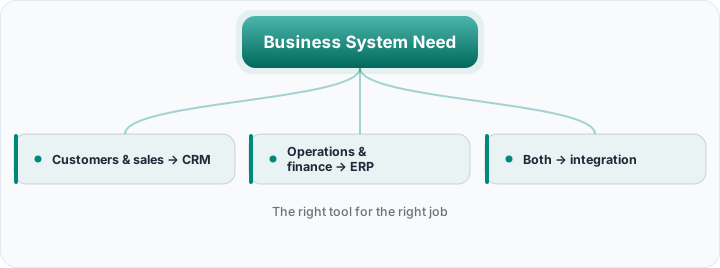
The right answer depends on where your biggest pain is. If your bottleneck is winning and keeping customers — slipping leads, an invisible sales pipeline, scattered customer information — you need a CRM first. If your bottleneck is operations — inventory chaos, production planning, scattered finance — you should look at the ERP side first. In practice, most small service and B2C businesses start the journey with a CRM because they don't carry a complex inventory/production load; heavy-operations businesses feel the ERP need earlier. Trying to set up both at once is unnecessary complexity for most SMBs.
If you need both: integration
As you grow, you may need both a CRM and an ERP — and in that case the key word is integration. The two systems should talk to each other: a sale closed in the CRM should turn into an order in the ERP; the inventory status in the ERP should be visible in the sales team's CRM. Two systems working disconnected create double data entry and inconsistency. The logic we cover in accounting software–CRM integration applies here too: what multiplies the value of tools is connecting them to each other. Two systems that are good separately but disconnected produce less value than the two working integrated.
The "all-in-one" trap
Some large ERP packages say "there's a CRM module too" — but this module is often weak for a real sales team. ERPs are designed for operations; the customer module bolted into them usually doesn't offer the flexibility, speed, and ease of use that sales needs. So while the "let one giant system do everything" approach looks appealing, it often results in the sales side not adopting it. Choosing the best tool for each job (best-of-breed) and integrating usually works better than a weak "all-in-one."
The difference in cost and complexity
An ERP is typically a heavier, more expensive investment with a longer setup — because it touches the entire operation of the business. A CRM is usually a lighter tool that sets up faster and produces value sooner. This difference matters: buying a heavy ERP to solve a CRM problem means both unnecessary cost and unnecessary complexity. Choose the tool that fits the size of your need; answering a small customer-management need with a giant ERP is like swatting a fly with a hammer.
Accounting software ≠ ERP
One more common confusion: many SMBs have accounting software, but this isn't a full ERP. Accounting software keeps the financial record; an ERP is a much broader system that integrates this with inventory, production, procurement, and more. As with the difference between bookkeeping and accounting, clarifying the concepts matters. The typical setup of a small business is often this: an accounting/bookkeeping software (not an ERP) + a CRM — the two integrated. The need for a full ERP arises when operations genuinely become complex.
A decision framework
You can reduce the decision to a simple question: is your biggest bottleneck on the customer side or the operations side? If sales and customer relationships are straining you → CRM. If the inventory, production, and finance operation is straining you → ERP. If both are critical → start with the most urgent, then add and integrate the other. Our CRM selection guide for SMBs and types of CRM articles help you make the right decision on the CRM side. Remember: the goal isn't to buy the system with the most features but to choose the tool that solves your real problem.
Keep the customer side light and powerful
Rocketly is a CRM focused on sales and customer relationships; it works integrated with your accounting/ERP tools, organizing your front office without a heavy implementation.
Start FreeCommon mistakes
- Confusing the two: Thinking a CRM is an ERP and expecting operations (or vice versa) leads to the wrong tool choice.
- Buying an ERP for a CRM problem: A heavy, expensive ERP is overkill for a simple customer-management need.
- Relying on a weak "all-in-one": The feeble CRM module inside an ERP isn't adopted by the sales team.
- Running the two disconnected: Without integration, double data entry and inconsistency arise.
- Mistaking accounting software for an ERP: The two aren't the same; concept confusion leads to wrong investment.
- Setting everything up at once: Unnecessary complexity for an SMB; starting with the most urgent bottleneck is healthier.
Decision checklist
- 1. Find your biggest bottleneck. The customer side or the operations side?
- 2. If it's a customer/sales problem → CRM. Slipping leads, invisible pipeline, scattered customer info.
- 3. If it's an operations/finance problem → ERP. Inventory, production, procurement, finance chaos.
- 4. If both are critical → the urgent one first, then integration. Don't try to set up both at once.
- 5. Solve the overlap with integration. Let order/invoice/customer data be consistent across both systems.
- 6. Choose the weight that fits the need. Don't buy a giant system for a small need.
Frequently asked questions
Are CRM and ERP the same thing?
No. A CRM manages the front office (customer, sales, marketing, service), an ERP the back office (inventory, production, accounting, finance, HR). There's an overlap zone (order, invoice, customer data) but each tool is deep on its own side; one doesn't fully replace the other.
Does a small business need both?
Usually no — at least not at the same time. Most small service and B2C businesses start with a CRM because they don't carry a complex operational load and make do with accounting software. The need for a full ERP arises when inventory/production/procurement genuinely become complex. As you grow both may be needed; then integration comes into play.
Why would I need a separate CRM when my ERP has a CRM module?
The CRM modules inside ERPs are usually a byproduct of an operations-focused design and lack the flexibility, speed, and ease of use that a real sales team needs. If the sales team doesn't adopt a weak module, that module stays empty. In most cases, integrating a strong CRM with the ERP gives a better result than relying on a weak built-in module.
Which is more expensive and harder to set up?
Usually the ERP — because it touches the entire operation of the business, requires a longer setup and a bigger investment. A CRM is typically a lighter tool that sets up faster and produces value sooner. So trying to solve a customer-management need with a heavy ERP creates unnecessary cost and complexity.
CRM and ERP aren't rivals but two different faces of the business: one manages the customer side (front office), the other operations (back office). The right choice depends on where your biggest bottleneck is — a CRM if winning customers is straining you, an ERP if operations is. When both are needed, the secret lies in integration. The goal isn't to buy the system that gathers the most modules; it's to choose the tool that solves your real problem and fits the weight of your need.